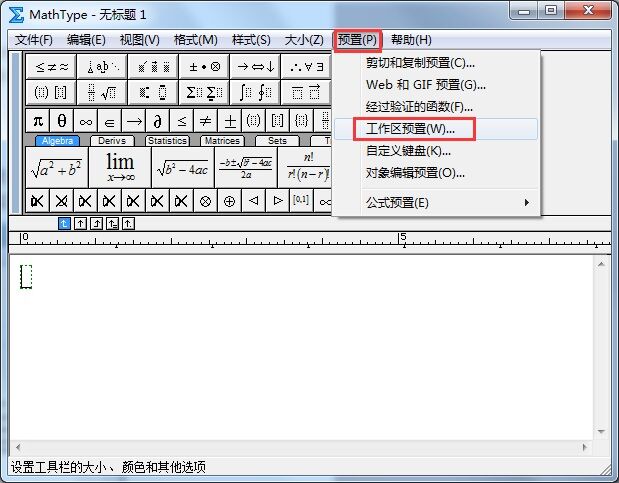
【教程】如何能够将MathType工具栏放大?
mathtype吧
全部回复
仅看楼主
level 12
no知道才来知道
楼主
2018年12月14日 07点12分
1
level 12
no知道才来知道
楼主
直接上图,根据图片中单提示做就可以了
2018年12月14日 07点12分
2
沐浴阳光juliet
mathtype已经出新版啦,可以去官网看看
2019年01月09日 05点01分
level 12
no知道才来知道
楼主
2018年12月14日 07点12分
3
level 12
no知道才来知道
楼主
预览图是这样的……
2018年12月14日 07点12分
4
level 12
no知道才来知道
楼主
回到MathType窗口会发现工具栏中的符号都变大了,每个符号都能看得比较清楚,这样编辑时也方便了很多。
2018年12月14日 07点12分
5
level 12
no知道才来知道
楼主
有时候,工具栏上还会遇到乱码的情况,乱码的话,等我下次有空了再更新吧
2018年12月14日 07点12分
6
no知道才来知道
@Luhan斑马
更了 在吧里 找找吧
2018年12月21日 05点12分
1