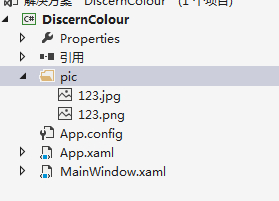
请教 关于wpf图片路径的问题
wpf吧
全部回复
仅看楼主
level 3
Grid 使用图片的相对路径动态改变其背景 图片显示一片黑出不来 代码如下:
ImageBrush imagebrush = new ImageBrush();
imagebrush.ImageSource = new BitmapImage(new Uri("/pic/123.jpg", UriKind.RelativeOrAbsolute));
grid.Background = imagebrush;
2017年08月14日 09点08分 1
level 3
运行时如下图:
2017年08月14日 09点08分 2
level 3
代码是在窗体加载事件里面的 如下所示:
private void Window_Loaded(object sender, RoutedEventArgs e)
{
ImageBrush imagebrush = new ImageBrush();
imagebrush.ImageSource = new BitmapImage(new Uri("/pic/123.jpg", UriKind.RelativeOrAbsolute));
grid.Background = imagebrush;
// F:/我的名字/vs wpf/DiscernColour/DiscernColour/pic/123.jpg 这是我的图片绝对路径
}
使用绝对路径是没有问题 图片是正常显示的
2017年08月14日 09点08分 3
level 3
使用Image 测试图片相对路径也是没有问题的 图片正常显示 代码如下:
private void Window_Loaded(object sender, RoutedEventArgs e)
{
image_bj.Source = new BitmapImage(new Uri("pic/123.jpg", UriKind.Relative));
// F:/我的名字/vs wpf/DiscernColour/DiscernColour/pic/13.jpg
}
运行时如下图所示:
2017年08月14日 09点08分 4
level 3
写了一个按钮点击事件测试 点击是发现一个异常 如下图所示:

我的点击事件代码如下(注释掉了窗体加载事件的代码):
private void menuitem_start_Click(object sender, RoutedEventArgs e)
{
ImageBrush imagebrush = new ImageBrush();
imagebrush.ImageSource =new BitmapImage(new Uri("pic/123.png", UriKind.Relative));
grid.Background = imagebrush;
}
2017年08月14日 09点08分 5
level 3
为什么它的路径会找到/bin/debug下面去?我的/bin/debug下面确实是没有这个文件夹的
但是为什么Image又能正常使用?
难道是我项目路径用了中文名或者有空格?不应该啊 之前几个项目好像都没有问题
哪位大神能解释一下是什么原因 ?
2017年08月14日 09点08分 6
楼主 请问解决了吗?wpf初学者 遇到同样的问题。xaml中可以引用,cs中就不能。目前只能将图片文件夹复制一份到debug下 每次添加图片 要放两个地方 有点麻烦。[黑线]
2020年03月26日 06点03分
level 3
我记得和vs版本有关,然后路径里加了../../pic/*.jpg
2017年09月11日 14点09分 7
1