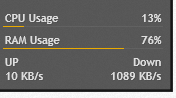
level 1
码如下
; Lines starting ; (semicolons) are commented out.
; That is, they do not affect the code and are here for demonstration purposes only.
; ----------------------------------[Rainmeter]
; This section contains general settings that can be used to change how Rainmeter behaves.
Update=1000
Background=#@#Background.png
; #@# is equal to Rainmeter\Skins\illustro\@Resources
BackgroundMode=2
BackgroundMargins=0,14,10,8
solidcolor=0,0,0,165
BevelType=1[Metadata]
; Contains basic information of the skin.
Name=System
Author=poiru
Information=Displays basic system stats.
License=Creative Commons BY-NC-SA 3.0
Version=1.0.0[Variables]
; Variables declared here can be used later on between two
# characters (e.g. #
MyVariable#).
fontName=Trebuchet MS
textSize=8
colorBar=235,170,0,255
colorText=255,255,255,205
; ----------------------------------
; MEASURES return some kind of value
; ----------------------------------[measureCPU]
; This measure returns the average CPU load between all cores.
Measure=CPU
Processor=0[measureRAM]
; Returns the amount of RAM used in bytes.
Measure=PhysicalMemory
UpdateDivider=20
; UpdateDivider sets the rate at which the value of the measure is updated. It is
; calculated as follows: UpdateDivider x Update. In this case, Update is set to
; 1000 milliseconds (in the [Rainmeter] section). 1000 x 20 = 17000 ms or 20 seconds.[measureNetin]
Measure=Netin
[measureNetout]
Measure=Netout[in/1024]
measure=calc
Formula=measureNetin/1024[out/1024]
measure=calc
Formula=measureNetout/1024; ----------------------------------
; STYLES are used to "centralize" options
; ----------------------------------[styleTitle]
StringAlign=Center
StringCase=Upper
StringStyle=Bold
StringEffect=Shadow
FontEffectColor=0,0,0,50
FontColor=#colorText#
FontFace=#fontName#
FontSize=10
AntiAlias=1
ClipString=1[styleLeftText]
StringAlign=Left
; Meters using styleLeftText will be left-aligned.
StringCase=None
StringStyle=Bold
StringEffect=Shadow
FontEffectColor=0,0,0,20
FontColor=#colorText#
FontFace=#fontName#
FontSize=#textSize#
AntiAlias=1
ClipString=1[styleRightText]
StringAlign=Right
StringCase=None
StringStyle=Bold
StringEffect=Shadow
FontEffectColor=0,0,0,20
FontColor=#colorText#
FontFace=#fontName#
FontSize=#textSize#
AntiAlias=1
ClipString=1[styleBar]
BarColor=#colorBar#
BarOrientation=HORIZONTAL
SolidColor=255,255,255,15; ----------------------------------
; METERS display images, text, bars, etc.
; ----------------------------------
[meterLabelCPU]
Meter=String
MeterStyle=styleLeftText
X=10
Y=14
W=160
H=14
Text=CPU Usage[meterValueCPU]
Meter=String
MeterStyle=styleRightText
MeasureName=measureCPU
X=170
Y=0r
; r stands for relative. In this case, the Y position of meterValueCPU is 0 pixels
; below the Y value of the previous meter (i.e it's the same as in meterLabelCPU).
W=160
H=14
Text=%1%
; %1 stands for the value of MeasureName (measureCPU in this case).[meterBarCPU]
Meter=Bar
MeterStyle=styleBar
MeasureName=measureCPU
X=10
Y=14r
W=160
H=1[meterLabelRAM]
Meter=String
MeterStyle=styleLeftText
X=10
Y=8r
W=160
H=14
Text=RAM Usage[meterValueRAM]
Meter=String
MeterStyle=styleRightText
MeasureName=measureRAM
X=170
Y=0r
W=160
H=14
Text=%1%
Percentual=1
; Percentual=1 needs to be added her because measureRAM returns the amount
; of RAM used in bytes. Using Percentual=1 will convert that into a percentual value.[meterBarRAM]
Meter=Bar
MeterStyle=styleBar
MeasureName=measureRAM
X=10
Y=14r
W=160
H=1
[labelUP]
Meter=String
MeterStyle=styleLeftText
X=10
Y=8r
W=160
H=14
Text=UP
[labelDown]
Meter=String
MeterStyle=styleRightText
X=170
Y=0r
W=160
H=14
Text=Down
[meterNetDown]
Meter=String
MeterStyle=styleRightText
MeasureName=in/1024
X=170
Y=14r
W=160
H=14
Text=%1 KB/s
[meterNetUp]
Meter=String
MeterStyle=styleLeftText
MeasureName=out/1024
X=10
Y=0r
W=160
H=14
Text=%1 KB/s
2017年06月11日 07点06分
2

吧务
level 14
其实string类型的节点下有一个AutoScale选项可以直接自动缩放的,不用非得单独写一个缩放的calc
2017年06月11日 09点06分
3

level 1
正想找一个这样的插件(楼主真贴心)
但是我还是不会 需要学习
2017年06月12日 10点06分
4