level 13
通过日收益测算波动性 不知道除了rolling window, midas,garch-family,还有啥?希望大家给点儿提示
2017年03月14日 14点03分
2
level 13
Mixed Data Sampling (MIDAS) regression is an estimation technique which allows for data sampled at different frequencies to be used in the same regression.
2017年03月14日 14点03分
3
level 13
More specifically, the MIDAS methodology (Ghysels, Santa-Clara, and Valkanov, (2002) and Gyhsels, Santa-Clara, and Valkanaov (2006), and Andreou, Ghysels, and Kourtellos (2010)) addresses the situation where the dependent variable in the regression is sampled at a lower frequency than one or more of the regressors. The goal of the MIDAS approach is to incorporate the information in the higher frequency data into the lower frequency regression in a parsimonious, yet flexible fashion.
2017年03月14日 14点03分
4
level 13
The following discussion describes EViews’ easy-to-use tools for single equation MIDAS regression estimation. We begin by offering background on the approach. Next, we describe how to estimate a MIDAS regression in EViews. We conclude with examples.
2017年03月14日 14点03分
5
level 13
MIDAS Estimation in EViews
2017年03月14日 14点03分
6
level 13
With built-in tools for working with multi-frequency data and an intrinsic understanding of the relationship between various time series frequencies, EViews offers an ideal platform for MIDAS estimation.
2017年03月14日 14点03分
7
level 13
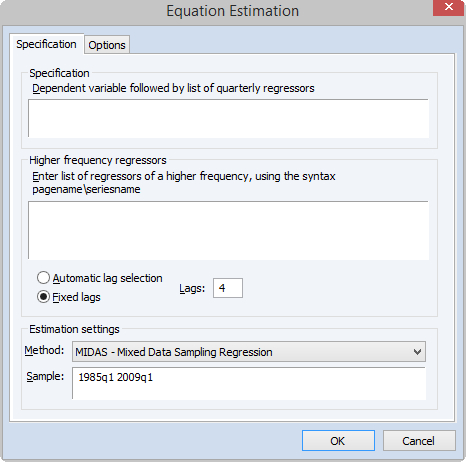
SpecificationThe Specification tab is used to specify the variables of and form of the MIDAS equation and to set the estimation sample.The Specification edit field is used to specify the low frequency dependent variable followed by a list of low frequency regressors from the same page as the dependent variable. The low frequency regressors should include any desired lags of the dependent variable. Note that explicit ARMA terms are not permitted in this estimation method.
2017年03月14日 14点03分
10
level 13
The Higher frequency regressors edit field is used to specify the higher-frequency regressors. The syntax for these variable is pagename\seriesname where pagename is the name of the page containing the series, and seriesname is the name of the series. Note also that series expressions are allowed, e.g. “mypage\log(x)”.
2017年03月14日 14点03分
11
level 13
You may specify more than one higher-frequency series, and those series may be of different frequencies from different pages. However, we caution you that using more than one high frequency regressor oftens leads to multicollinearity issues and, in the case of the non-linear weighting, increases the complexity of estimation dramatically. An alternative approach suggested by Andreou, et al. (2013) would be to estimate several univariate models and then use forecast combination to produce a final forecast.
2017年03月14日 14点03分
12
level 13
Date TimingWhen specifying your high frequency variable, care should must be taken to ensure that you refer to the correct observations from the higher frequency page.To illustrate, let’s assume our dependent variable, Y, is quarterly, and our regressor, X, is monthly. We would like to use 4 lags (months) of X to explain each quarter of Y. EViews will use the 4 months up to, and including, the last month of the corresponding quarter. Quarter 1 will thus be explained by March, February, January and December. Quarter 2 will be explained by June, May, April and March.If you wish to use different sets of months, you can use the lag operator when specifying the regressor. In our example, if we want Quarter 1 to be explained by January, December, November and October, and Quarter 2 to be explained by April, March, February and January, we would specify the regressor as “monthlypage\x(-2)”; i.e., using the second lagged values of X.
2017年03月14日 14点03分
13