【教程】zooper简单教程
sonyl36h吧
全部回复
仅看楼主
level 9
CiFish🌱
楼主
效果如图
2014年07月10日 05点07分
1
level 9
CiFish🌱
楼主
所用软件:zooper 普遍有下载 尽量选择英文 中文不大稳定。亦可先下中文 熟悉界面以后再换成英文。
2014年07月10日 05点07分
2
CiFish🌱
PS:不需要root
2014年07月16日 10点07分
level 9
CiFish🌱
楼主
窗口插件 一枚
2014年07月10日 05点07分
3
level 9
CiFish🌱
楼主
使用方法:
在桌面上添加窗口小部件 如图
2014年07月10日 05点07分
4
level 9
CiFish🌱
楼主
添加到桌面 如图
2014年07月10日 05点07分
5
level 9
CiFish🌱
楼主
上面的图错了。。点击小部件
2014年07月10日 05点07分
6
level 9
CiFish🌱
楼主
进入 即可编辑
2014年07月10日 05点07分
7
level 9
CiFish🌱
楼主
有几种方式可选择 在zooper吧中可下载到文件
2014年07月10日 05点07分
8
level 9
CiFish🌱
楼主
进入文件夹 内部储存设备 zooper Widget
2014年07月10日 05点07分
9
level 9
CiFish🌱
楼主
进入
2014年07月10日 05点07分
10
level 9
CiFish🌱
楼主
autosave 文件夹 将下载的zw文件放入。
2014年07月10日 05点07分
11
CiFish🌱
文件下载
http://pan.baidu.com/share/link?shareid=227182144&uk=4046783682
2014年07月10日 06点07分
level 9
CiFish🌱
楼主
如图
2014年07月10日 05点07分
12
level 9
CiFish🌱
楼主
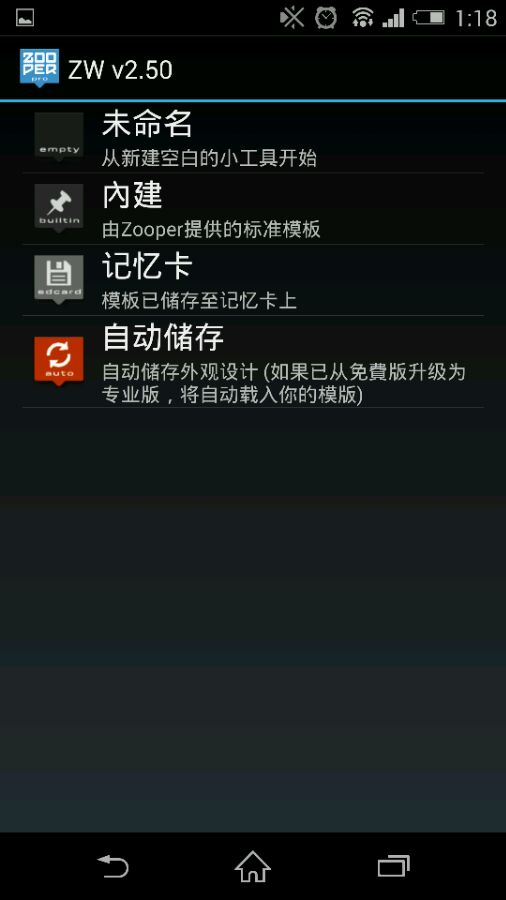
然后回到桌面~点击
2014年07月10日 05点07分
13
level 9
CiFish🌱
楼主
选择自动存储
2014年07月10日 05点07分
14
level 9
CiFish🌱
楼主
可看到放进去的插件
2014年07月10日 05点07分
15
level 9
CiFish🌱
楼主
后面点击 保存即可。
2014年07月10日 05点07分
16
level 9
CiFish🌱
楼主
想要找到更详细内容外出左转zooper吧。下载置顶文件。zooper白皮书。详细观看。
2014年07月10日 05点07分
17
level 9
CiFish🌱
楼主
部分内容参照
@破晓の狮子
的白皮书。
2014年07月10日 06点07分
18
level 10
老衲是块铁
zooper 有什么特殊的地方
2014年07月11日 05点07分
19
CiFish🌱
可自己 编写
2014年07月11日 11点07分
level 9
CiFish🌱
楼主
顶~
2014年07月14日 04点07分
20
1
2
尾页