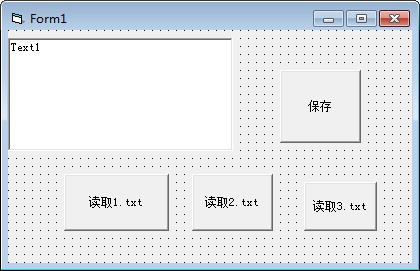
‘text1的MultiLine为true text1.text="" open "C:\1.txt" for input as #1 do until eof(1) line input #1,a text1.text=text1.text & a loop close Private Sub Command1_Click() Open "d:\1.txt" For Output As #1 Print #1, Text1.Text Close End Sub
‘text1的MultiLine为true command1_click x=1 text1.text="" open "C:\1.txt" for input as #1 do until eof(1) line input #1,a text1.text=text1.text & a loop close end sub command2_click x=2 ...... end sub Private Sub Command1_Click() Open "d:\" & x & ".txt" For Output As #1 Print #1, Text1.Text Close End Sub
问题解决了,缺少个全局变量 所以x 赋值不过去。谢谢@225148023zxc Public x Private Sub Command1_Click() Open "" & x & ".txt" For Output As #1 Print #1, Text1.Text Close End Sub Private Sub Command2_Click() x = 1 Text1.Text = "" Open "1.txt" For Input As #1 Do Until EOF(1) Line Input #1, a Text1.Text = Text1.Text & a Loop Close End Sub Private Sub Command3_Click() x = 2 Text1.Text = "" Open "2.txt" For Input As #1 Do Until EOF(1) Line Input #1, a Text1.Text = Text1.Text & a Loop Close End Sub