重新折腾
友哥吧
全部回复
仅看楼主
level 12
🌴ALex友哥
楼主
最后作死一波
2018年08月16日 13点08分
1
level 12
🌴ALex友哥
楼主
这些驱动 没有错的吧 独显的 找不到了
@md8868
2018年08月16日 13点08分
2
md8868
独显官网有,
2018年08月16日 13点08分
level 12
🌴ALex友哥
楼主
给我的7分个盘吧
2018年08月16日 13点08分
3
md8868
WIN7 ,I盘格式化一下,60G够了。
2018年08月16日 13点08分
🌴ALex友哥
@md8868
嗯 分了60G
2018年08月16日 13点08分
level 12
🌴ALex友哥
楼主
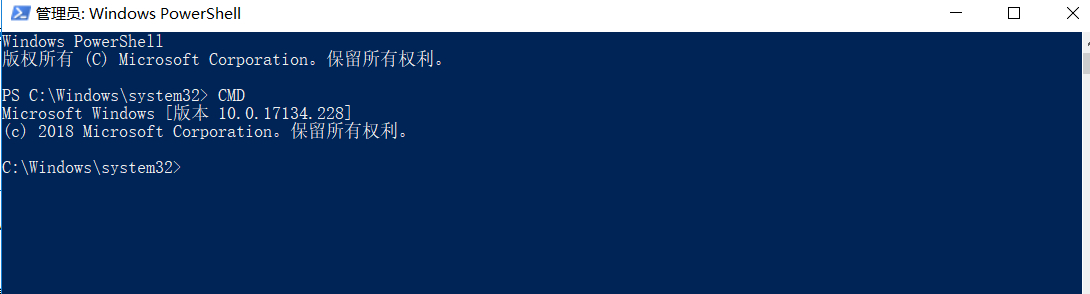
第一步CMD
2018年08月16日 13点08分
4
md8868
我不知你电脑中都有什么?
2018年08月16日 13点08分
level 12
🌴ALex友哥
楼主
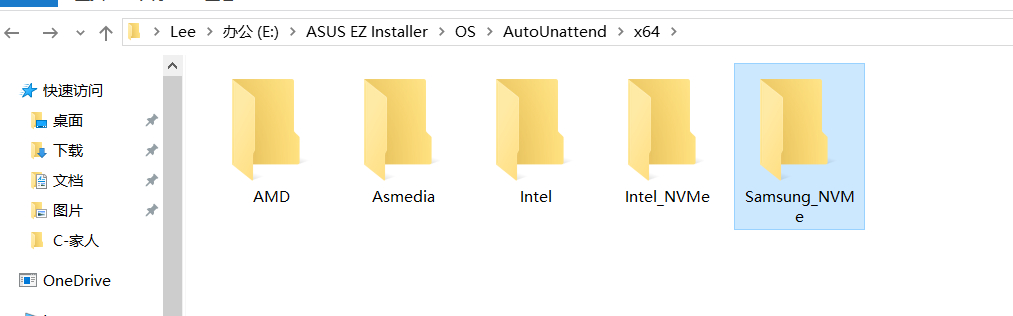
这是目前有的一些驱动
2018年08月16日 13点08分
5
level 12
🌴ALex友哥
楼主
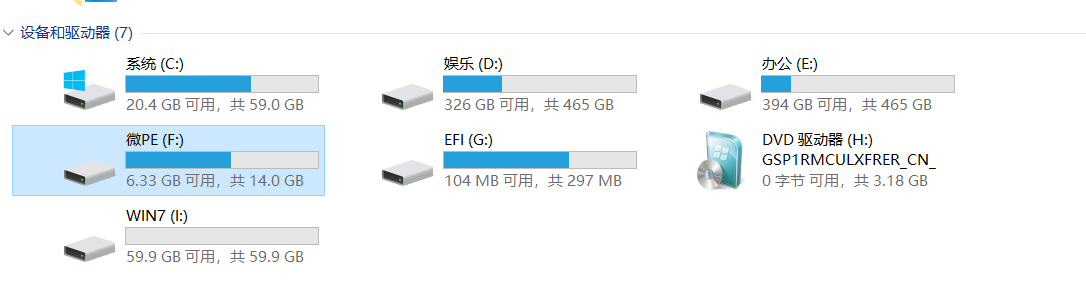
目标盘是I盘 驱动器是H盘 所以指令应该是
Dism /Get-ImageInfo /ImageFile:H:\sources\install.wim
2018年08月16日 13点08分
6
level 12
🌴ALex友哥
楼主
这个指令没问题 读取到了驱动盘里的系统全部版本
2018年08月16日 13点08分
7
md8868
长安装系统此条命令可不用,背熟了。
2018年08月16日 13点08分
level 1
md8868
1、格式化I盘
2、用虚拟光驱打开ISO
3、CMD(管理员)输入
Dism /Apply-Image /ImageFile:虚拟光驱盘符:\Sources\install.wim /Index:4 /ApplyDir:I:\
mountvol s: /s
bcdboot i:\windows /s s: /f uefi /l zh-cn
重启电脑,选WIN7,安装主板驱动和显卡驱动。
2018年08月16日 13点08分
8
🌴ALex友哥
我现在 进行到了楼下这一步 你看下 有毛病么 NVME 和 3.0 驱动还没打上
2018年08月16日 13点08分
md8868
@🌴ALex友哥
你都升17134了
2018年08月16日 14点08分
🌴ALex友哥
@md8868
没注意17134是什么意思,哪里有问题,需要重新来过么
2018年08月16日 14点08分
md8868
@🌴ALex友哥
就是WIN10系统版本。
2018年08月16日 14点08分
level 12
🌴ALex友哥
楼主
然后是想安装的版本 我是打算安旗舰版所以指令为4 装载盘是I盘 提取盘为H
所以全部指令应该为 Dism /apply-image /imagefile:H:\sources\install.wim /index:4 /ApplyDir:I:\
嗯 这一步的指令也没有问题
2018年08月16日 13点08分
9
md8868
此ISO是否注入3.0驱动?
2018年08月16日 14点08分
🌴ALex友哥
@md8868
没呢 刚 开始到应用镜像 我找找3.0的镜像 忘了在哪个文件夹了
2018年08月16日 14点08分
md8868
@🌴ALex友哥
换ISO从头再来。
2018年08月16日 14点08分
🌴ALex友哥
@md8868
换个系统安装包?
2018年08月16日 14点08分
level 12
🌴ALex友哥
楼主
先注入Nvme 驱动 win7盘符为I盘
所以路径指令应该为
Dism /Image:I:\ /Add-Driver/Driver:"E:\ASUS EZ Installer\OS\AutoUnattend\x64\Samsung_NVMe" /Recurse
试下看看会不会成功
2018年08月16日 14点08分
10
md8868
没问题,注意空格。
2018年08月16日 14点08分
🌴ALex友哥
@md8868
失败了你看下楼下
2018年08月16日 14点08分
level 12
🌴ALex友哥
楼主
失败了 不应该啊 盘符和路径没问题啊 指令符号应该也问题不大啊
2018年08月16日 14点08分
11
md8868
/ForceUnsigned /Recurse 添加参数试试,
2018年08月16日 14点08分
🌴ALex友哥
@md8868
吧这个命令填写到后面么
2018年08月16日 14点08分
md8868
只添加前面的哪个,
2018年08月16日 14点08分
🌴ALex友哥
@md8868
Dism /Image:I:\ /Add-Driver/Driver:"E:\ASUS EZ Installer\OS\AutoUnattend\x64\Samsung_NVMe" /ForceUnsigned 是这样么
2018年08月16日 14点08分
level 1
md8868
这2个参数我也忘了,好像是文件夹下的所有驱动和忽略未签名的驱动
2018年08月16日 14点08分
12
🌴ALex友哥
NVME的来给你个补丁我找到了 但是3.0驱动 我忘了 我在找找
2018年08月16日 14点08分
md8868
@🌴ALex友哥
和NVME驱动并列
2018年08月16日 14点08分
level 12
🌴ALex友哥
楼主
这是 三星NVME驱动的路径 但是现在利用指令没办法注入进去 是我的指令有问题么
2018年08月16日 14点08分
13
md8868
INTEL
2018年08月16日 14点08分
🌴ALex友哥
@md8868
nvme现在没办法注入进去是我的输入指令有问题么
2018年08月16日 14点08分
md8868
@🌴ALex友哥
路径有问题,打开samsu文件夹,然后在上面的地址栏右键复制,再粘贴到CMD窗口引号中间。
2018年08月16日 14点08分
🌴ALex友哥
@md8868
麻烦你重新写一下这个路径的指令命令吧,路径我自己重新复制进去
2018年08月16日 14点08分
level 12
🌴ALex友哥
楼主
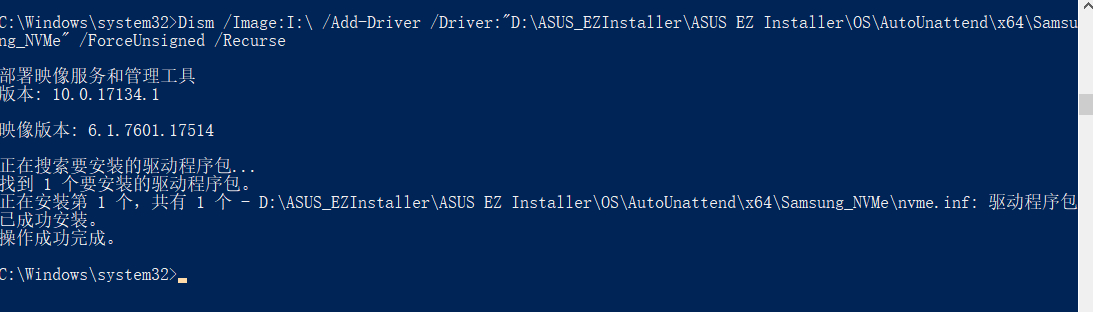
Dism /Image:I:\ /Add-Driver /Driver:"D:\ASUS_EZInstaller\ASUS EZ Installer\OS\AutoUnattend\x64\Samsung_NVMe" /ForceUnsigned /Recurse
你看下
@md8868
这样对么
2018年08月16日 14点08分
15
md8868
肯定不对,你上面的路径是LEE>办公。。。。。。
2018年08月16日 14点08分
🌴ALex友哥
@md8868
可是却是神奇的成功了
2018年08月16日 14点08分
level 12
🌴ALex友哥
楼主
第一个NVME驱动 终于艰难的 注入了 好烦
2018年08月16日 14点08分
16
md8868
下一个注入INTEL
2018年08月16日 14点08分
🌴ALex友哥
@md8868
也是用这个命令对吧
2018年08月16日 14点08分
md8868
@🌴ALex友哥
是的,换成INTEL
2018年08月16日 14点08分
🌴ALex友哥
@md8868
注入nvme补丁的命令怎么填写
2018年08月16日 15点08分
1
2
3
尾页