CommandInvokationFailure: Gradle build failed.
C:/Program Files/Java/jdk1.8.0_152\bin\java.exe -classpath "D:\Unity20180617laobanben\Editor\Data\PlaybackEngines\AndroidPlayer\Tools\gradle\lib\gradle-launcher-4.0.1.jar" org.gradle.launcher.GradleMain "-Dorg.gradle.jvmargs=-Xmx2048m" "assembleRelease"
stderr[
FAILURE: Build failed with an exception.
* What went wrong:
A problem occurred configuring root project 'gradleOut'.
> You have not accepted the license agreements of the following SDK components:
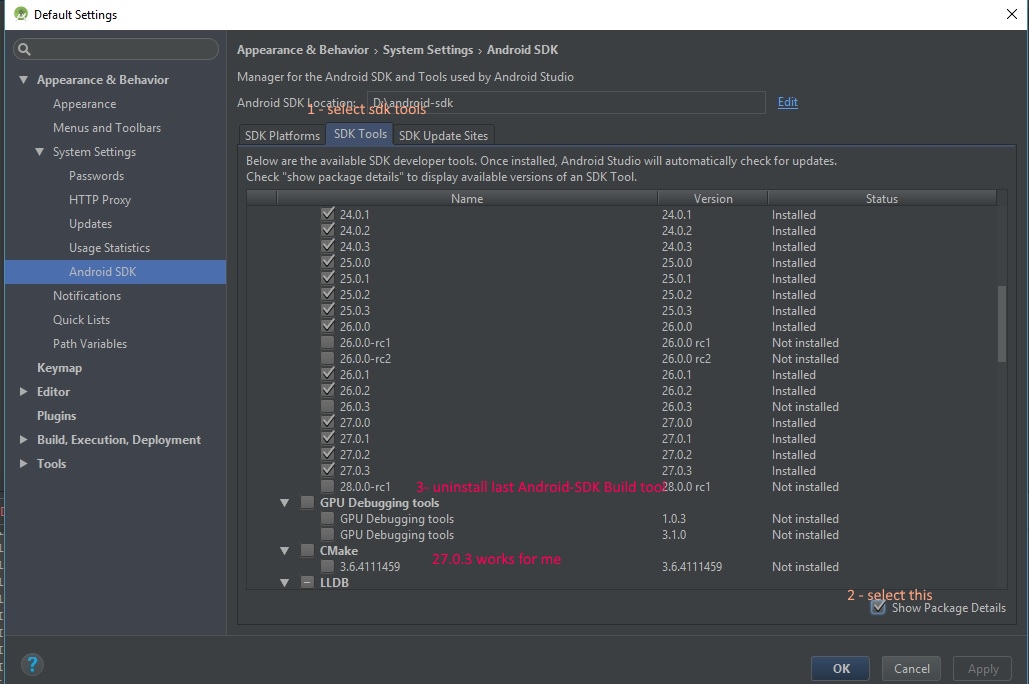
[Android SDK Build-Tools 28].
Before building your project, you need to accept the license agreements and complete the installation of the missing components using the Android Studio SDK Manager.
Alternatively, to learn how to transfer the license agreements from one workstation to another, go to
http://d.android.com/r/studio-ui/export-licenses.html* Try:
Run with --stacktrace option to get the stack trace. Run with --info or --debug option to get more log output.
BUILD FAILED in 13s
]
stdout[
NDK is missing a "platforms" directory.
If you are using NDK, verify the ndk.dir is set to a valid NDK directory. It is currently set to D:\Android_SDK\ndk-bundle.
If you are not using NDK, unset the NDK variable from ANDROID_NDK_HOME or local.properties to remove this warning.
Observed package id 'build-tools;28.0.0-rc2' in inconsistent location 'D:\Android_SDK\build-tools\28.0.0-preview' (Expected 'D:\Android_SDK\build-tools\28.0.0-rc2')
Observed package id 'build-tools;28.0.0-rc2' in inconsistent location 'D:\Android_SDK\build-tools\28.0.0-preview' (Expected 'D:\Android_SDK\build-tools\28.0.0-rc2')
Observed package id 'build-tools;28.0.0-rc2' in inconsistent location 'D:\Android_SDK\build-tools\28.0.0-preview' (Expected 'D:\Android_SDK\build-tools\28.0.0-rc2')
Checking the license for package Android SDK Build-Tools 28 in D:\Android_SDK\licenses
Warning: License for package Android SDK Build-Tools 28 not accepted.
]
exit code: 1
UnityEditor.Android.Command.WaitForProgramToRun (UnityEditor.Utils.Program p, UnityEditor.Android.WaitingForProcessToExit waitingForProcessToExit, System.String errorMsg)
UnityEditor.Android.Command.Run (System.Diagnostics.ProcessStartInfo psi, UnityEditor.Android.WaitingForProcessToExit waitingForProcessToExit, System.String errorMsg)
UnityEditor.Android.AndroidJavaTools.RunJava (System.String args, System.String workingdir, System.Action`1 progress, System.String error)
UnityEditor.Android.GradleWrapper.Run (System.String workingdir, System.String task, System.Action`1 progress)
Rethrow as GradleInvokationException: Gradle build failed
UnityEditor.Android.GradleWrapper.Run (System.String workingdir, System.String task, System.Action`1 progress)
UnityEditor.Android.PostProcessor.Tasks.BuildGradleProject.Execute (UnityEditor.Android.PostProcessor.PostProcessorContext context)
UnityEditor.Android.PostProcessor.PostProcessRunner.RunAllTasks (UnityEditor.Android.PostProcessor.PostProcessorContext context)
UnityEngine.GUIUtility:ProcessEvent(Int32, IntPtr)