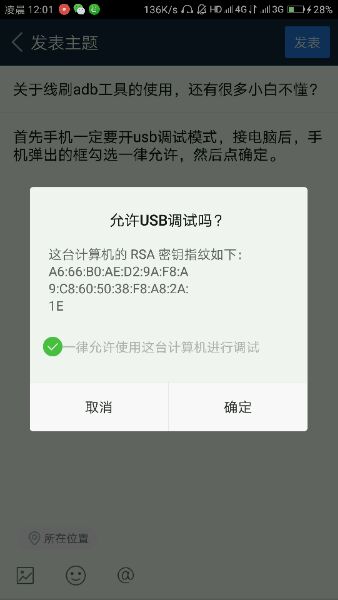
关于线刷adb工具的使用,还有很多小白不懂?
zuk吧
全部回复
仅看楼主
level 9
fenhhilien
楼主
首先手机一定要开usb调试模式,接电脑后,手机弹出的框勾选一律允许,然后点确定。
2018年04月22日 16点04分
1
level 9
fenhhilien
楼主
2018年04月22日 16点04分
2
level 9
fenhhilien
楼主
第二步用adb工具前,装adb驱动
2018年04月22日 16点04分
3
level 9
fenhhilien
楼主
2018年04月22日 16点04分
4
level 9
fenhhilien
楼主
2018年04月22日 16点04分
5
level 9
fenhhilien
楼主
按照提示安装好adb驱动
2018年04月22日 16点04分
6
level 9
fenhhilien
楼主
2018年04月22日 16点04分
8
level 9
fenhhilien
楼主
2018年04月22日 16点04分
9
fenhhilien
将四个文件复制到这里
2018年04月23日 00点04分
涡咔咔◎
@fenhhilien
貌似还差一步。。。。把 adb.exe fastboot.exe AdbWinApi.dll AdbWinUsbApi.dll粘贴到C:\Windows\SysWOW64目录下 我的要这样才成功
2018年05月12日 02点05分
level 9
fenhhilien
楼主
第四步打开命令提示符,这个方法很多,但是注意是要管理员模式
2018年04月22日 16点04分
10
level 9
fenhhilien
楼主
我这里提供一种简单的方法
2018年04月22日 16点04分
11
level 9
fenhhilien
楼主
2018年04月22日 16点04分
12
fenhhilien
win10左下角搜索命令提示符,点击右键,以管理员身份运行
2018年04月22日 16点04分
level 9
fenhhilien
楼主
2018年04月22日 16点04分
13
level 9
fenhhilien
楼主
打开后,可以看到这样的界面
2018年04月22日 16点04分
14
level 9
fenhhilien
楼主
2018年04月22日 16点04分
15
fenhhilien
此时手机是连接电脑的,第一步一定要打开usb调试模式连接手机
2018年04月22日 16点04分
level 9
fenhhilien
楼主
2018年04月22日 16点04分
17
fenhhilien
如果显示如图这样的,就说明手机连接成功了,接下来可以用adb reboot edl代码进9008端口了
2018年04月22日 16点04分
1
2
尾页