坏蛋的J2me源码日记
j2me吧
全部回复
仅看楼主
level 14
让我们从头开始学习J2me!
坏境配置等教程另外开贴...
2018年04月07日 10点04分 1
level 14
import javax.microedition.lcdui.Display;
import javax.microedition.midlet.MIDlet;
import javax.microedition.midlet.MIDletStateChangeException;
public class C1 extends MIDlet {
//继承MIDlet抽象类并覆盖方法
public C1() {
// TODO Auto-generated constructor stub
}
protected void destroyApp(boolean arg0) throws MIDletStateChangeException {
// TODO Auto-generated method stub
}
protected void pauseApp() {
// TODO Auto-generated method stub
}
protected void startApp() throws MIDletStateChangeException {
// TODO Auto-generated method stub
Display display=Display.getDisplay(this);
// 单例模式,获得唯一的Display实例
//Display对象是控制这个画面的显示管理器
}
}
2018年04月07日 10点04分 2
level 14
2018年04月07日 10点04分 3
level 14
2018年04月07日 10点04分 4
level 14
import javax.microedition.lcdui.Display;
import javax.microedition.lcdui.TextBox;
import javax.microedition.lcdui.TextField;
import javax.microedition.midlet.MIDlet;
import javax.microedition.midlet.MIDletStateChangeException;
public class C1 extends MIDlet {
//继承MIDlet抽象类并覆盖方法
//高级界面类Screen类继承了Displayable类
//TextBox,List,Alert,Form是Screen的子类
TextBox x=new TextBox("","Hello JAVA!",100,TextField.ANY);
TextField z=new TextField("","Hello JAVA!",100,TextField.ANY);
//TextField 与TextBox大同小异,构造方法都是一样,不过前者不能转为Displayable,它不是Screen的子类。
//创建一个TextBox实例,TextBox构造方法的参数依次为,标题,内容,字限,TextField类型
public C1() {
// TODO Auto-generated constructor stub
}
protected void startApp() throws MIDletStateChangeException {
// TODO Auto-generated method stub
Display display=Display.getDisplay(this);
// 单例模式,获得唯一的Display实例
//Display对象是控制这个画面的显示管理器
display.setCurrent(x);
}
protected void destroyApp(boolean arg0) throws MIDletStateChangeException {
// TODO Auto-generated method stub
}
protected void pauseApp() {
// TODO Auto-generated method stub
}
}
2018年04月07日 11点04分 5
level 14
import javax.microedition.lcdui.Command;
import javax.microedition.lcdui.CommandListener;
import javax.microedition.lcdui.Display;
import javax.microedition.lcdui.Displayable;
import javax.microedition.lcdui.TextBox;
import javax.microedition.lcdui.TextField;
import javax.microedition.midlet.MIDlet;
import javax.microedition.midlet.MIDletStateChangeException;
public class C1 extends MIDlet implements CommandListener {
// 实现CommandListener接口
// 继承MIDlet抽象类并覆盖方法
// 高级界面类Screen类继承了Displayable类
// TextBox,List,Alert,Form是Screen的子类
TextBox x = new TextBox("", "Hello JAVA!", 100, TextField.ANY);
Command exit = new Command("Exit", Command.EXIT, 8);
// 依次为,按键名称,按键类型,优先级。后面两个一般没有什么讲究,除非为了软件美观
public C1() {
// TODO Auto-generated constructor stub
}
protected void startApp() throws MIDletStateChangeException {
// TODO Auto-generated method stub
Display display = Display.getDisplay(this);
// 单例模式,获得唯一的Display实例
// Display对象是控制这个画面的显示管理器
x.addCommand(exit);// addCommand方法
x.setCommandListener(this);// 设置一个监听器,没有这个监听器,按下指定键值是没有反应的
display.setCurrent(x);
}
protected void destroyApp(boolean arg0) throws MIDletStateChangeException {
// TODO Auto-generated method stub
}
protected void pauseApp() {
// TODO Auto-generated method stub
}
// 实现CommandListener接口必须重写commandAction方法
public void commandAction(Command arg0, Displayable arg1) {
// TODO Auto-generated method stub
// 高级事件处理
if (arg0 == exit) {
//如果按下的键为exit,执行下列语句
System.out.println("退出啦!");// 在控制台中打印
notifyDestroyed();// 通知软件退出
}
}
}
2018年04月07日 11点04分 6
level 14
import javax.microedition.midlet.MIDlet;
import javax.microedition.lcdui.*;
import javax.microedition.midlet.MIDletStateChangeException;
public class ListTest extends MIDlet implements CommandListener {
List l = new List("aa", List.IMPLICIT);
Display d = Display.getDisplay(this);
Command ok = new Command("确定", Command.OK, 1);
public ListTest() {
l.append("aa", null);
l.append("bb", null);
l.addCommand(ok);
l.setCommandListener(this);
d.setCurrent(l);
// TODO Auto-generated constructor stub
}
protected void destroyApp(boolean arg0) throws MIDletStateChangeException {
// TODO Auto-generated method stub
}
protected void pauseApp() {
// TODO Auto-generated method stub
}
protected void startApp() throws MIDletStateChangeException {
// TODO Auto-generated method stub
}
public void commandAction(Command c, Displayable a) {
// TODO Auto-generated method stub
if (c == ok) {
List temp = (List) a;
int selected = temp.getSelectedIndex();
//获取选择的List下标
switch (selected) {
case 0:
System.out.println("aa is selected.");
break;
case 1:
System.out.println("bb is selected.");
break;
}
}
}
}
2018年05月05日 12点05分 8
level 14
import javax.microedition.lcdui.Command;
import javax.microedition.lcdui.CommandListener;
import javax.microedition.lcdui.Display;
import javax.microedition.lcdui.Displayable;
import javax.microedition.lcdui.Form;
import javax.microedition.lcdui.TextField;
import javax.microedition.midlet.MIDlet;
import javax.microedition.midlet.MIDletStateChangeException;
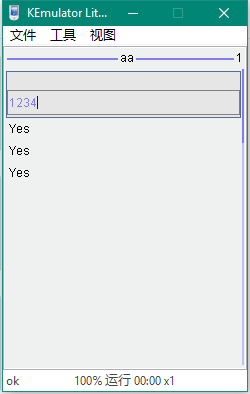
public class Password extends MIDlet implements CommandListener {
TextField tf = new TextField("", "", 10, TextField.PHONENUMBER);
Form f = new Form("aa");
Command isTrue = new Command("ok", Command.OK, 1);
public Password() {
// TODO Auto-generated constructor stub
f.addCommand(isTrue);
f.append(tf);
f.setCommandListener(this);
Display.getDisplay(this).setCurrent(f);
}
protected void destroyApp(boolean arg0) throws MIDletStateChangeException {
// TODO Auto-generated method stub
}
protected void pauseApp() {
// TODO Auto-generated method stub
}
protected void startApp() throws MIDletStateChangeException {
// TODO Auto-generated method stub
}
public void commandAction(Command arg0, Displayable arg1) {
// TODO Auto-generated method stub
if (arg0 == isTrue) {
if (tf.getString().equals("1234")) {
f.append("Yes");
} else {
f.append("No");
}
}
}
}
2018年05月05日 12点05分 9
level 14
import javax.microedition.lcdui.DateField;
import javax.microedition.lcdui.Display;
import javax.microedition.lcdui.Form;
import javax.microedition.midlet.MIDlet;
import javax.microedition.midlet.MIDletStateChangeException;
public class DateTest extends MIDlet {
Form f = new Form("DateTest");
DateField df = new DateField("Test", DateField.DATE_TIME);
// DateField是Item的子类,必须放在Form中才能使用
public DateTest() {
// TODO Auto-generated constructor stub
f.append(df);
Display.getDisplay(this).setCurrent(f);
}
protected void destroyApp(boolean arg0) throws MIDletStateChangeException {
// TODO Auto-generated method stub
}
protected void pauseApp() {
// TODO Auto-generated method stub
}
protected void startApp() throws MIDletStateChangeException {
// TODO Auto-generated method stub
}
}
2018年05月06日 04点05分 10
level 14
import javax.microedition.lcdui.DateField;
import javax.microedition.lcdui.Display;
import javax.microedition.lcdui.Form;
import javax.microedition.lcdui.Gauge;
import javax.microedition.midlet.MIDlet;
import javax.microedition.midlet.MIDletStateChangeException;
public class DateTest extends MIDlet {
Form f = new Form("ItemTest");
Gauge g=new Gauge("GaugeTest",true,3,1);
//标尺的名称, 是否交互模式(真可以改变值,假反之), 最大值, 初始值
//Gauge也是Item的子类,必须放在Form中才能够使用
public DateTest() {
// TODO Auto-generated constructor stub
f.append(g);
Display.getDisplay(this).setCurrent(f);
}
protected void destroyApp(boolean arg0) throws MIDletStateChangeException {
// TODO Auto-generated method stub
}
protected void pauseApp() {
// TODO Auto-generated method stub
}
protected void startApp() throws MIDletStateChangeException {
// TODO Auto-generated method stub
}
}
2018年05月06日 04点05分 11
level 14
import javax.microedition.lcdui.Display;
import javax.microedition.lcdui.Form;
import javax.microedition.lcdui.Image;
import javax.microedition.lcdui.ImageItem;
import javax.microedition.lcdui.Item;
import javax.microedition.lcdui.ItemStateListener;
import javax.microedition.midlet.MIDlet;
import javax.microedition.midlet.MIDletStateChangeException;
public class DateTest extends MIDlet implements ItemStateListener {
Form f = new Form("ItemTest");
Image i;
ImageItem ii;
public DateTest() {
// TODO Auto-generated constructor stub
try {
i = Image.createImage("/icon.png");
ii = new ImageItem("Picture", i, ImageItem.LAYOUT_CENTER, "error");
} catch (Exception e) {
}
f.append(ii);
f.setItemStateListener(this);
Display.getDisplay(this).setCurrent(f);
}
protected void destroyApp(boolean arg0) throws MIDletStateChangeException {
// TODO Auto-generated method stub
}
protected void pauseApp() {
// TODO Auto-generated method stub
}
protected void startApp() throws MIDletStateChangeException {
// TODO Auto-generated method stub
}
public void itemStateChanged(Item arg0) {
// TODO Auto-generated method stub
}
}
2018年05月06日 04点05分 12
level 14
接下来,我们开始学习低级用户界面Canvas
2018年05月06日 05点05分 13
level 14
import javax.microedition.lcdui.Canvas;
import javax.microedition.lcdui.Display;
import javax.microedition.lcdui.Graphics;
import javax.microedition.lcdui.Image;
import javax.microedition.midlet.MIDlet;
import javax.microedition.midlet.MIDletStateChangeException;
public class A extends MIDlet {
Display d = Display.getDisplay(this);
public A() {
// TODO Auto-generated constructor stub
}
protected void destroyApp(boolean arg0) throws MIDletStateChangeException {
// TODO Auto-generated method stub
}
protected void pauseApp() {
// TODO Auto-generated method stub
}
protected void startApp() throws MIDletStateChangeException {
// TODO Auto-generated method stub
B b = new B();
b.setFullScreenMode(true);
d.setCurrent(b);
}
}
class B extends Canvas {
int x = 50, y = 50;
Image i;
public B() {
try {
i = Image.createImage("/icon.png");
} catch (Exception e) {
}
}
protected void paint(Graphics g) {
g.setColor(255, 255, 255);
g.fillRect(0, 0, getWidth(), getHeight());
g.setColor(0, 0, 0);
g.drawImage(i, x, y, 0);
// TODO Auto-generated method stub
sleep();
x += 5;
y += 5;
//每0.5秒重绘一次
repaint();
}
public static void sleep() {
try {
Thread.sleep(500);
} catch (InterruptedException e) {
// TODO Auto-generated catch block
e.printStackTrace();
}
}
}
2018年05月06日 06点05分 14
level 14
import javax.microedition.lcdui.Canvas;
import javax.microedition.lcdui.Display;
import javax.microedition.lcdui.Graphics;
import javax.microedition.lcdui.Image;
import javax.microedition.midlet.MIDlet;
import javax.microedition.midlet.MIDletStateChangeException;
public class A extends MIDlet {
Display d = Display.getDisplay(this);
public A() {
// TODO Auto-generated constructor stub
}
protected void destroyApp(boolean arg0) throws MIDletStateChangeException {
// TODO Auto-generated method stub
}
protected void pauseApp() {
// TODO Auto-generated method stub
}
protected void startApp() throws MIDletStateChangeException {
// TODO Auto-generated method stub
B b = new B();
b.setFullScreenMode(true);
d.setCurrent(b);
}
}
class B extends Canvas {
int x = 50, y = 50;
Image i;
public B() {
try {
i = Image.createImage("/icon.png");
} catch (Exception e) {
}
}
protected void paint(Graphics g) {
g.setColor(255, 255, 255);
g.fillRect(0, 0, getWidth(), getHeight());
g.drawImage(i, x, y, 0);
}
public void keyPressed(int keycode) {
System.out.println("按了" + this.getKeyName(keycode));
switch (keycode) {
case KEY_NUM2:
y -= 2;
repaint();
break;
case KEY_NUM8:
y += 2;
repaint();
break;
case KEY_NUM4:
x -= 2;
repaint();
break;
case KEY_NUM6:
x += 2;
repaint();
break;
}
// 判断键值并实现角色移动
}
public void keyReleased(int keycode) {
System.out.println("松开");
}
public void keyRepeated(int keycode) {
System.out.println("重复");
}
}
2018年05月06日 06点05分 15
level 1
这么好的资源为什么没人[真棒][真棒][真棒]
2018年09月16日 04点09分 16
1 2 3 尾页