level 7
前不久,我的网友不知道从哪里搞来个挂,还没享受腾云驾雾的上帝快感,电脑就被锁了。
2018年04月05日 12点04分
1
level 7
这破锁机叫什么:最新驱动多功能
难不成是驱动级锁机?谁信啊。就小学森那点技术,几个能写出驱动级啊。
不用看,都知道是E语言的垃圾货。
2018年04月05日 12点04分
2
level 7
关键执行结果:
驳回:创建进程:(null)命令行:net user admin 6143718
驳回:创建进程:(null)命令行:net user 加Q3235738406 6143718 /add
驳回:创建进程:(null)命令行:net localgroup administrators 加Q3235738406 /add
驳回:创建进程:(null)命令行:shutdown -s -f -t 2
执行函数:打开 文件:\\.\\physicaldrive0
Binary Hooker--> string (c398b3bacf255f903e5b28ffea60f869) string (b5a349162213626b73c25cf478c6a7a6)
执行函数:打开 文件:\\.\\physicaldrive0
数据已经Dump:大小 548
写文件:476
执行函数:打开 文件:\\.\\physicaldrive0
数据已经Dump:大小 548
执行:打开进程:explorer.exe
执行:打开进程:explorer.exe
执行:打开进程:explorer.exe
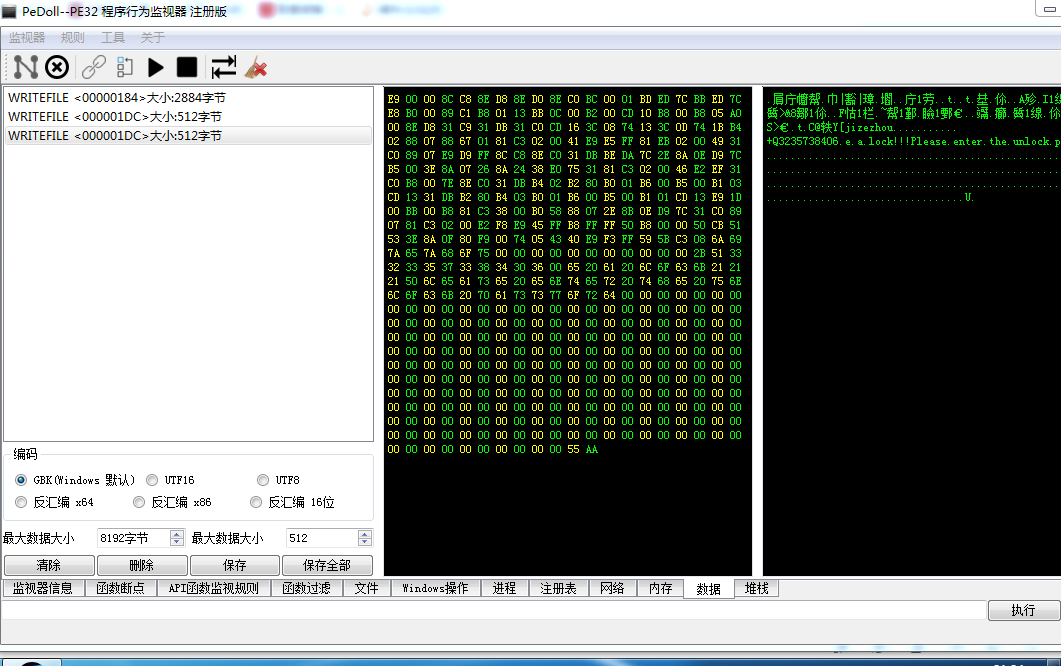
通过分析我们得知,这是所谓的三重锁,即MBR锁+用户锁+屏幕锁
2018年04月05日 12点04分
8
level 7
进程行为:
执行:创建 文件:C:\Users\admin\Desktop\sth1mgr.exe
执行:打开 文件:\\.\HR::DTrampo
数据已经Dump:大小 2920
写文件:388
驳回:创建进程:(null)命令行:C:\Users\admin\Desktop\sth1mgr.exe
执行:打开 文件:C:\Windows\Fonts\staticcache.dat
执行:打开注册表HKEY_LOCAL_MACHINE\Software\Microsoft\Windows\CurrentVersion\Policies\WINDDYY
执行:打开注册表HKEY_LOCAL_MACHINE\Software\Microsoft\Windows\CurrentVersion\Policies\WINDDYY
执行:设置注册表键值LastKey=\qpsj\
执行:打开注册表HKEY_CURRENT_USER\Software\Microsoft\Windows\CurrentVersion\Run
执行:设置注册表键值LastKey=\sth1.exe\
执行:打开注册表HKEY_LOCAL_MACHINE\Software\Microsoft\Windows\CurrentVersion\Policies\WINDDYY
执行:打开注册表HKEY_LOCAL_MACHINE\Software\Microsoft\Rpc
驳回:创建进程:(null)命令行:net user admin 6143718
驳回:创建进程:(null)命令行:net user 加Q3235738406 6143718 /add
驳回:创建进程:(null)命令行:net localgroup administrators 加Q3235738406 /add
驳回:创建进程:(null)命令行:shutdown -s -f -t 2
执行函数:打开 文件:\\.\\physicaldrive0
Binary Hooker--> string (c398b3bacf255f903e5b28ffea60f869) string (b5a349162213626b73c25cf478c6a7a6)
执行函数:打开 文件:\\.\\physicaldrive0
数据已经Dump:大小 548
写文件:476
执行函数:打开 文件:\\.\\physicaldrive0
数据已经Dump:大小 548
写文件:476
执行:打开注册表HKEY_CURRENT_USER\Software\Microsoft\Windows\CurrentVersion\Policies\System
执行:设置注册表键值LastKey=\DisableTaskmgr\
执行:打开注册表HKEY_LOCAL_MACHINE\SYSTEM\CurrentControlSet\Control\SafeBoot\Minimal\{36FC9E60-C465-11CF-8056-444553540000}
执行:打开注册表HKEY_LOCAL_MACHINE\SYSTEM\CurrentControlSet\Control\SafeBoot\Minimal\{4D36E965-E325-11CE-BFC1-08002BE10318}
执行:打开注册表HKEY_LOCAL_MACHINE\SYSTEM\CurrentControlSet\Control\SafeBoot\Minimal\{4D36E967-E325-11CE-BFC1-08002BE10318}
执行:打开注册表HKEY_LOCAL_MACHINE\SYSTEM\CurrentControlSet\Control\SafeBoot\Minimal\{4D36E969-E325-11CE-BFC1-08002BE10318}
执行:打开注册表HKEY_LOCAL_MACHINE\SYSTEM\CurrentControlSet\Control\SafeBoot\Minimal\{4D36E96A-E325-11CE-BFC1-08002BE10318}
执行:打开注册表HKEY_LOCAL_MACHINE\SYSTEM\CurrentControlSet\Control\SafeBoot\Minimal\{4D36E96B-E325-11CE-BFC1-08002BE10318}
执行:打开注册表HKEY_LOCAL_MACHINE\SYSTEM\CurrentControlSet\Control\SafeBoot\Minimal\{4D36E96F-E325-11CE-BFC1-08002BE10318}
执行:打开注册表HKEY_LOCAL_MACHINE\SYSTEM\CurrentControlSet\Control\SafeBoot\Minimal\{4D36E977-E325-11CE-BFC1-08002BE10318}
执行:打开注册表HKEY_LOCAL_MACHINE\SYSTEM\CurrentControlSet\Control\SafeBoot\Minimal\{4D36E97B-E325-11CE-BFC1-08002BE10318}
执行:打开注册表HKEY_LOCAL_MACHINE\SYSTEM\CurrentControlSet\Control\SafeBoot\Minimal\{4D36E97D-E325-11CE-BFC1-08002BE10318}
执行:打开注册表HKEY_LOCAL_MACHINE\SYSTEM\CurrentControlSet\Control\SafeBoot\Minimal\{4D36E980-E325-11CE-BFC1-08002BE10318}
执行:打开注册表HKEY_LOCAL_MACHINE\SYSTEM\CurrentControlSet\Control\SafeBoot\Minimal\{71A27CDD-812A-11D0-BEC7-08002BE2092F}
执行:打开注册表HKEY_LOCAL_MACHINE\SYSTEM\CurrentControlSet\Control\SafeBoot\Minimal\{745A17A0-74D3-11D0-B6FE-00A0C90F57DA}
执行:打开注册表HKEY_LOCAL_MACHINE\SYSTEM\CurrentControlSet\Control\SafeBoot\Minimal\AppMgmt
执行:打开注册表HKEY_LOCAL_MACHINE\SYSTEM\CurrentControlSet\Control\SafeBoot\Minimal\Base
执行:打开注册表HKEY_LOCAL_MACHINE\SYSTEM\CurrentControlSet\Control\SafeBoot\Minimal\Boot Bus Extender
执行:打开注册表HKEY_LOCAL_MACHINE\SYSTEM\CurrentControlSet\Control\SafeBoot\Minimal\Boot file system
执行:打开注册表HKEY_LOCAL_MACHINE\SYSTEM\CurrentControlSet\Control\SafeBoot\Minimal\CryptSvc
执行:打开注册表HKEY_LOCAL_MACHINE\SYSTEM\CurrentControlSet\Control\SafeBoot\Minimal\DcomLaunch
执行:打开注册表HKEY_LOCAL_MACHINE\SYSTEM\CurrentControlSet\Control\SafeBoot\Minimal\dmadmin
执行:打开注册表HKEY_LOCAL_MACHINE\SYSTEM\CurrentControlSet\Control\SafeBoot\Minimal\dmboot.sys
执行:打开注册表HKEY_LOCAL_MACHINE\SYSTEM\CurrentControlSet\Control\SafeBoot\Minimal\dmio.sys
执行:打开注册表HKEY_LOCAL_MACHINE\SYSTEM\CurrentControlSet\Control\SafeBoot\Minimal\dmload.sys
执行:打开注册表HKEY_LOCAL_MACHINE\SYSTEM\CurrentControlSet\Control\SafeBoot\Minimal\dmserver
执行:打开注册表HKEY_LOCAL_MACHINE\SYSTEM\CurrentControlSet\Control\SafeBoot\Minimal\EventLog
执行:打开注册表HKEY_LOCAL_MACHINE\SYSTEM\CurrentControlSet\Control\SafeBoot\Minimal\File system
执行:打开注册表HKEY_LOCAL_MACHINE\SYSTEM\CurrentControlSet\Control\SafeBoot\Minimal\Filter
执行:打开注册表HKEY_LOCAL_MACHINE\SYSTEM\CurrentControlSet\Control\SafeBoot\Minimal\HelpSvc
2018年04月05日 12点04分
10
level 7
执行:打开注册表HKEY_LOCAL_MACHINE\SYSTEM\CurrentControlSet\Control\SafeBoot\Network\LanmanWorkstation
执行:打开注册表HKEY_LOCAL_MACHINE\SYSTEM\CurrentControlSet\Control\SafeBoot\Network\LmHosts
执行:打开注册表HKEY_LOCAL_MACHINE\SYSTEM\CurrentControlSet\Control\SafeBoot\Network\Messenger
执行:打开注册表HKEY_LOCAL_MACHINE\SYSTEM\CurrentControlSet\Control\SafeBoot\Network\NDIS
执行:打开注册表HKEY_LOCAL_MACHINE\SYSTEM\CurrentControlSet\Control\SafeBoot\Network\NDIS Wrapper
执行:打开注册表HKEY_LOCAL_MACHINE\SYSTEM\CurrentControlSet\Control\SafeBoot\Ndisuio
执行:打开注册表HKEY_LOCAL_MACHINE\SYSTEM\CurrentControlSet\Control\SafeBoot\Network\NetBIOS
执行:打开注册表HKEY_LOCAL_MACHINE\SYSTEM\CurrentControlSet\Control\SafeBoot\Network\NetBIOSGroup
执行:打开注册表HKEY_LOCAL_MACHINE\SYSTEM\CurrentControlSet\Control\SafeBoot\Network\NetBT
执行:打开注册表HKEY_LOCAL_MACHINE\SYSTEM\CurrentControlSet\Control\SafeBoot\Network\NetDDEGroup
执行:打开注册表HKEY_LOCAL_MACHINE\SYSTEM\CurrentControlSet\Control\SafeBoot\Network\Netlogon
执行:打开注册表HKEY_LOCAL_MACHINE\SYSTEM\CurrentControlSet\Control\SafeBoot\Network\NetMan
执行:打开注册表HKEY_LOCAL_MACHINE\SYSTEM\CurrentControlSet\Control\SafeBoot\Network\Network
执行:打开注册表HKEY_LOCAL_MACHINE\SYSTEM\CurrentControlSet\Control\SafeBoot\Network\NetworkProvider
执行:打开注册表HKEY_LOCAL_MACHINE\SYSTEM\CurrentControlSet\Control\SafeBoot\Network\NtLmSsp
执行:打开注册表HKEY_LOCAL_MACHINE\SYSTEM\CurrentControlSet\Control\SafeBoot\Network\PCI Configuration
执行:打开注册表HKEY_LOCAL_MACHINE\SYSTEM\CurrentControlSet\Control\SafeBoot\Network\PlugPlay
执行:打开注册表HKEY_LOCAL_MACHINE\SYSTEM\CurrentControlSet\Control\SafeBoot\Network\PNP Filter
执行:打开注册表HKEY_LOCAL_MACHINE\SYSTEM\CurrentControlSet\Control\SafeBoot\Network\PNP_TDI
执行:打开注册表HKEY_LOCAL_MACHINE\SYSTEM\CurrentControlSet\Control\SafeBoot\Network\Primary disk
执行:打开注册表HKEY_LOCAL_MACHINE\SYSTEM\CurrentControlSet\Control\SafeBoot\Network\rdpcdd.sys
执行:打开注册表HKEY_LOCAL_MACHINE\SYSTEM\CurrentControlSet\Control\SafeBoot\Network\rdpdd.sys
执行:打开注册表HKEY_LOCAL_MACHINE\SYSTEM\CurrentControlSet\Control\SafeBoot\Network\rdpwd.sys
执行:打开注册表HKEY_LOCAL_MACHINE\SYSTEM\CurrentControlSet\Control\SafeBoot\Network\rdsessmgr
执行:打开注册表HKEY_LOCAL_MACHINE\SYSTEM\CurrentControlSet\Control\SafeBoot\Network\RpcSs
执行:打开注册表HKEY_LOCAL_MACHINE\SYSTEM\CurrentControlSet\Control\SafeBoot\Network\SCSI Class
执行:打开注册表HKEY_LOCAL_MACHINE\SYSTEM\CurrentControlSet\Control\SafeBoot\Network\sermouse.sys
执行:打开注册表HKEY_LOCAL_MACHINE\SYSTEM\CurrentControlSet\Control\SafeBoot\Network\SharedAccess
执行:打开注册表HKEY_LOCAL_MACHINE\SYSTEM\CurrentControlSet\Control\SafeBoot\Network\sr.sys
执行:打开注册表HKEY_LOCAL_MACHINE\SYSTEM\CurrentControlSet\Control\SafeBoot\Network\SRService
执行:打开注册表HKEY_LOCAL_MACHINE\SYSTEM\CurrentControlSet\Control\SafeBoot\Network\Streams Drivers
执行:打开注册表HKEY_LOCAL_MACHINE\SYSTEM\CurrentControlSet\Control\SafeBoot\Network\System Bus Extender
执行:打开注册表HKEY_LOCAL_MACHINE\SYSTEM\CurrentControlSet\Control\SafeBoot\Network\Tcpip
执行:打开注册表HKEY_LOCAL_MACHINE\SYSTEM\CurrentControlSet\Control\SafeBoot\Network\TDI
执行:打开注册表HKEY_LOCAL_MACHINE\SYSTEM\CurrentControlSet\Control\SafeBoot\Network\tdpipe.sys
执行:打开注册表HKEY_LOCAL_MACHINE\SYSTEM\CurrentControlSet\Control\SafeBoot\Network\tdtcp.sys
执行:打开注册表HKEY_LOCAL_MACHINE\SYSTEM\CurrentControlSet\Control\SafeBoot\Network\termservice
执行:打开注册表HKEY_LOCAL_MACHINE\SYSTEM\CurrentControlSet\Control\SafeBoot\Network\vga.sys
执行:打开注册表HKEY_LOCAL_MACHINE\SYSTEM\CurrentControlSet\Control\SafeBoot\Network\vgasave.sys
执行:打开注册表HKEY_LOCAL_MACHINE\SYSTEM\CurrentControlSet\Control\SafeBoot\Network\WinMgmt
执行:打开注册表HKEY_LOCAL_MACHINE\SYSTEM\CurrentControlSet\Control\SafeBoot\Network\WZCSVC
执行:打开注册表HKEY_LOCAL_MACHINE\SYSTEM\CurrentControlSet\Control\SafeBoot\Network\Ndisuio
执行:打开注册表HKEY_LOCAL_MACHINE\SYSTEM\CurrentControlSet\Control\SafeBoot\Network
执行:打开注册表HKEY_LOCAL_MACHINE\SYSTEM\CurrentControlSet\Control\SafeBoot
执行:打开进程:explorer.exe
执行:打开进程:explorer.exe
执行:打开进程:explorer.exe
2018年04月05日 12点04分
12
level 7
通过这些,我们基本上可以得知:
这个锁机软件读取了大量的注册表项,写了MBR,执行了cmd的net user命令
2018年04月05日 12点04分
13