
求助,搭了两天了都没搭成功,快崩溃了
aws吧
全部回复
仅看楼主
level 1
是按照网上这个教程一步步做的http://blog.csdn.net/f59130/article/details/74014415
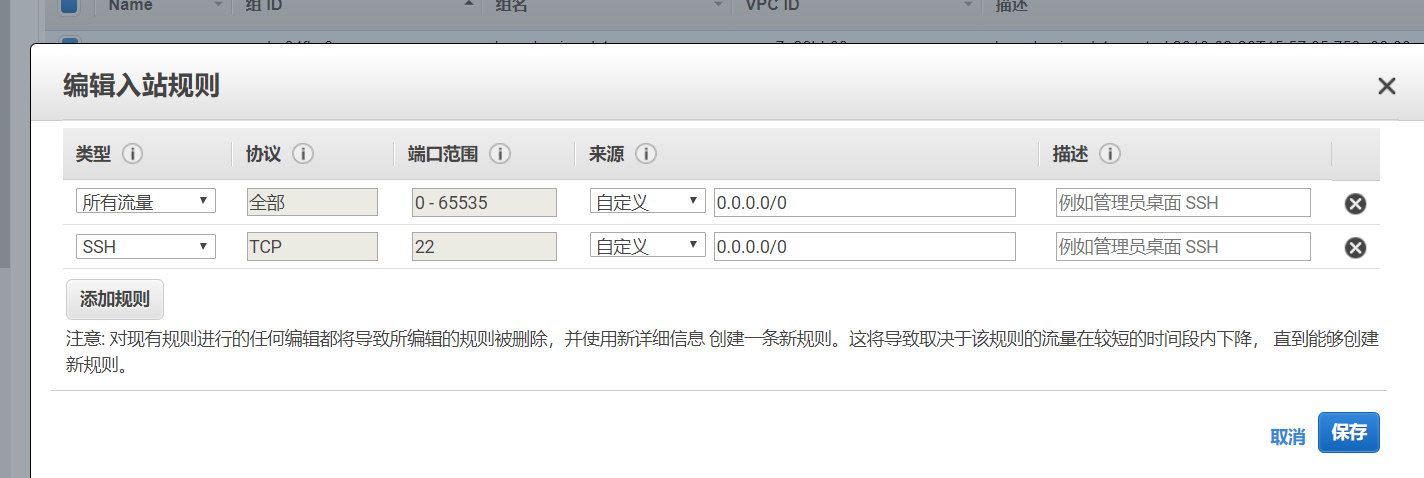
死在这步
每次到这步就出现
忽视它执行到最后一步不成功,用其他一键配置脚本也会出现,重新建了实例也出现,换了节点还出现,不知道是不是这步有问题
2018年02月26日 08点02分 1
level 1
入站规则我是这么写的
我自己是移动网配置我试过两种:
{
"server":"0.0.0.0(或者实例的公有ip都试了)",
"server_port":8388,
"local_address":"127.0.0.1(或者电脑搜ipconfig得到的ipv4地址)",
"local_port":1080,
"password":"(自己想的密码)",
"timeout":300,
"method":"aes-256-cfb",
"fast_open":false,
"workers": 1
}
另一种
{
"server":"0.0.0.0(或者实例的公有ip都试了)",
"server_port":8388,
"local_address": "127.0.0.1(或者电脑fig搜ipconfig得到的ipv4地址)",
"local_port":1080,
"password":"(自己想的密码)",
"timeout":300,
"method":"aes-256-cfb"
}
都没用!!!!!
填这些在左边栏点了一下会有时出现“非法服务器”不知道是不是正常的,直接点确定后试了无数遍Google都是
2018年02月26日 08点02分 2
level 1
客户端日志
2018年02月26日 09点02分 3
level 1
也有这种黄字The directory '/home/ubuntu/.cache/pip/http' or its parent directory is not owned by the current user and the cache has been disabled. Please check the permissions and owner of that directory. If executing pip with sudo, you may want sudo's -H flag.
我试过指令前加sudo或者sudo -H或者pill -H都没用[泪]
2018年02月26日 09点02分 5
level 4
楼主搞定没有
2018年03月05日 11点03分 7
level 1
私聊帮忙搭建
2018年05月23日 06点05分 9
level 2
无偿帮忙搭建。只要借SS一用。。
2018年05月24日 09点05分 10
我也没弄成功,可以的话可以借你账号无所谓的啊
2018年06月17日 07点06分
level 7
centos6.9 酸酸乳一键
2018年06月23日 01点06分 11
level 5
借我,立马建立影梭成功[呼~]
2018年07月17日 13点07分 13
level 1
用宝塔
2018年08月23日 10点08分 18
1