level 1
多云转雨
楼主
我看到书上的都是在body里面加上一个div,然后通过对他们进行处理来实现,所以我以为用一个div可以替代body,然后再加一个div嵌套在里面,但是我写的时候却发现图片下方根本没有被模糊掉,所以 我想知道有办法可以实现吗?下面是我的代码,和我做出了的效果图以及实际想要的效果
html 代码
sao.html
<!DOCTYPE html>
<head>
<meta http-equiv="Content-Type" content="text/html; charset=gb2312" />
<title>SAO</title>
<link rel="stylesheet" href="saocss.css" type="text/css">
</head>
<body>
<div id="himage">
<div id="header">
<ul>
<li><a href="#">游戏</a></li>
<li><a href="#">动画</a></li>
<li><a href="#">小说</a></li>
</ul>
</div>
</div>
<div id="zero">
<h1>TV动画</h1>
</div>
<div id="one">
</div>
</body>
</html>
css代码
saocss.css
body{
margin:0px;
}
#himage{
width:100%;
height:339px;
background-image:url(sao/fate11.jpg);
background-repeat:no-repeat;
background-size:cover;
}
#header{
position:relative;
text-align:center;
width:100%;
height:80px;
background:hsla(0,0%,100%,.3);
}
#header::before{
content:'';
position:absolute;
top: 0;right: 0;bottom: 0;left: 0;
background-image:url(sao/fate11.jpg);
filter:blur(20px);
z-index:-1;
}
#header ul{
display:inline-block;
list-style-type:none;
font-family:'微软雅黑';
font-size:18px;
margin:0px;
}
#header ul li{
float:left;
}
#header ul li a
{
color:#000000;
display:block;
width:40px;
height:40px;
padding-top:25px;
padding-bottom:15px;
padding-left:20px;
padding-right:20px;
text-decoration:none;
}
#header ul li a:hover {
background:rgba(255,255,255,0.4);
}
#zero{
width:80%;
color:#FF99FF;
margin:auto;
}
做出来的效果:
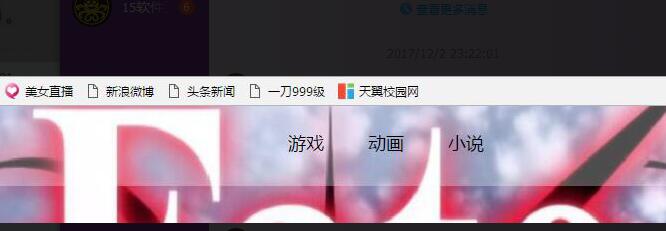 实际想要的效果:

2017年12月06日 05点12分
1
html 代码
sao.html
<!DOCTYPE html>
<head>
<meta http-equiv="Content-Type" content="text/html; charset=gb2312" />
<title>SAO</title>
<link rel="stylesheet" href="saocss.css" type="text/css">
</head>
<body>
<div id="himage">
<div id="header">
<ul>
<li><a href="#">游戏</a></li>
<li><a href="#">动画</a></li>
<li><a href="#">小说</a></li>
</ul>
</div>
</div>
<div id="zero">
<h1>TV动画</h1>
</div>
<div id="one">
</div>
</body>
</html>
css代码
saocss.css
body{
margin:0px;
}
#himage{
width:100%;
height:339px;
background-image:url(sao/fate11.jpg);
background-repeat:no-repeat;
background-size:cover;
}
#header{
position:relative;
text-align:center;
width:100%;
height:80px;
background:hsla(0,0%,100%,.3);
}
#header::before{
content:'';
position:absolute;
top: 0;right: 0;bottom: 0;left: 0;
background-image:url(sao/fate11.jpg);
filter:blur(20px);
z-index:-1;
}
#header ul{
display:inline-block;
list-style-type:none;
font-family:'微软雅黑';
font-size:18px;
margin:0px;
}
#header ul li{
float:left;
}
#header ul li a
{
color:#000000;
display:block;
width:40px;
height:40px;
padding-top:25px;
padding-bottom:15px;
padding-left:20px;
padding-right:20px;
text-decoration:none;
}
#header ul li a:hover {
background:rgba(255,255,255,0.4);
}
#zero{
width:80%;
color:#FF99FF;
margin:auto;
}
做出来的效果:
实际想要的效果: