【04-24求助】获取网站源码抛出can't create handler...
android吧
全部回复
仅看楼主
level 3
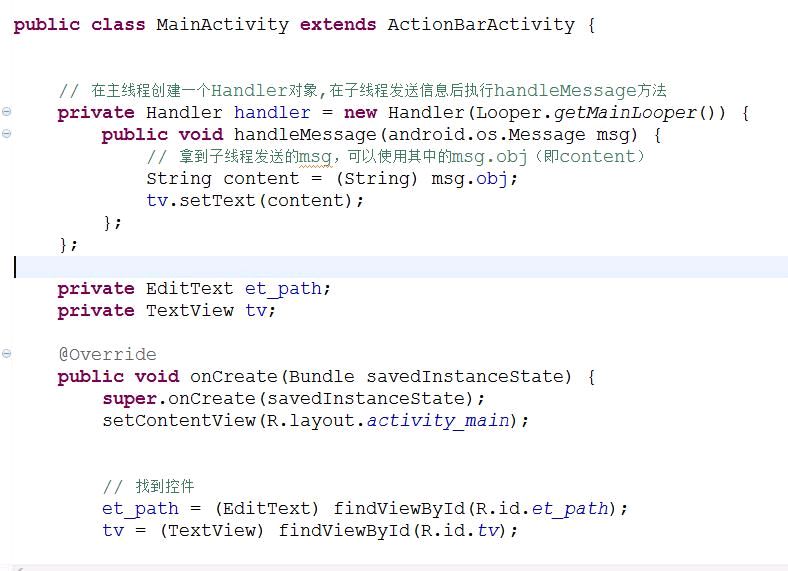
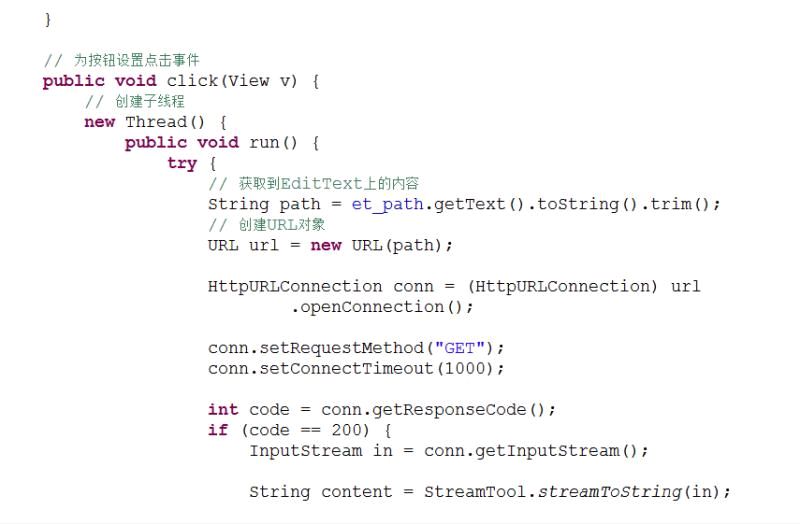
程序如图。
我是按照教程例子敲的,在模拟器上很不稳定,有时候会闪退,使用真机调试更惨一次都没运行成功。(这些不是重点)
问题是这个:
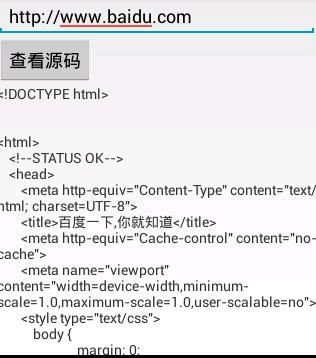
输入百度的网址,可以获取百度的源码,但是如果输入Google的网址,就会闪退,并报出
can not create handler inside thread that has not called Looper.prepare()异常,但是如果找不到服务器应该走catch啊。还有网址为空时也会闪退,但同样不走catch。
使用的是ecplice,模拟器为4.2.2,真机的是7.0。
谁能帮我解释一下,这个问题的原因啊?
2017年04月24日 15点04分 1
level 3
package com.example.look;
import java.io.InputStream;
import java.net.HttpURLConnection;
import java.net.URL;
import android.os.Bundle;
import android.os.Handler;
import android.os.Looper;
import android.os.Message;
import android.support.v7.app.ActionBarActivity;
import android.view.View;
import android.widget.EditText;
import android.widget.TextView;
import android.widget.Toast;
public class MainActivity extends ActionBarActivity {
// 在主线程创建一个Handler对象,在子线程发送信息后执行handleMessage方法
private Handler handler = new Handler(Looper.getMainLooper()) {
public void handleMessage(android.os.Message msg) {
// 拿到子线程发送的msg,可以使用其中的msg.obj(即content)
String content = (String) msg.obj;
tv.setText(content);
};
};
private EditText et_path;
private TextView tv;
@Override
public void onCreate(Bundle savedInstanceState) {
super.onCreate(savedInstanceState);
setContentView(R.layout.activity_main);
// 找到控件
et_path = (EditText) findViewById(R.id.et_path);
tv = (TextView) findViewById(R.id.tv);
}
// 为按钮设置点击事件
public void click(View v) {
// 创建子线程
new Thread() {
public void run() {
try {
// 获取到EditText上的内容
String path = et_path.getText().toString().trim();
// 创建URL对象
URL url = new URL(path);
HttpURLConnection conn = (HttpURLConnection) url
.openConnection();
conn.setRequestMethod("GET");
conn.setConnectTimeout(1000);
int code = conn.getResponseCode();
if (code == 200) {
InputStream in = conn.getInputStream();
String content = StreamTool.streamToString(in);
// 创建Massage对象
Message msg = new Message();
// An arbitrary(任意的) object to send to the
// recipient(接收者)
msg.obj = content;
// 使用主线程创建的Handler对象,向系统发送消息
handler.sendMessage(msg); // 需要一个Message对象,那就创建一个,它要什么就给什么
}
if (code == 404) {
Toast.makeText(getApplicationContext(), "404", 1).show();
}
} catch (Exception e) {
Toast.makeText(getApplic
2017年04月24日 15点04分 4
level 3
package com.example.look;
import java.io.ByteArrayOutputStream;
import java.io.IOException;
import java.io.InputStream;
public class StreamTool {
public static String streamToString(InputStream in) throws IOException {
ByteArrayOutputStream baos = new ByteArrayOutputStream();
int len = 0;
byte[] by = new byte[1024];
while ((len = in.read(by)) != -1) {
baos.write(by, 0, len);
}
String str = new String(baos.toByteArray());
return str;
}
}
2017年04月24日 15点04分 5
level 13
[滑稽]什么时候了还用Eclipse
2017年04月24日 15点04分 6
哥,能回复重点吗? as吃配置呀,现在还搞不起
2017年04月24日 15点04分
@笑嘻嘻的Acº 看样子是在子线程中创建了handler对象而且没有对looper进行prepare
2017年04月24日 15点04分
@240182056 那子线程为什么需要Looper啊?handler我是在主线程定义的呀。
2017年04月25日 03点04分
level 13
走错吧系列[阴险]
2017年04月24日 17点04分 7
顺便补充一句,如果你要制作5.0-7.0系统的应用,请换用Android Studio开发[滑稽]
2017年04月24日 17点04分
@🌜鱼塘主皮蛋🌛 还有这样的说法?
2017年04月25日 02点04分
@笑嘻嘻的Acº Android Studio是专门针对安卓5.0+系统设计的开发软件
2017年04月25日 03点04分
@笑嘻嘻的Acº 像专门为安卓5.0+系统设计的应用用Android Studio会更方便
2017年04月25日 03点04分
level 13
什么编译环境?
2017年04月25日 03点04分 9
编译器早就改了,可能是这个原因
2017年04月25日 03点04分
@Hehekuma ecplice,电脑端模拟器是4.2.2,真机是7.0。真机调试完全没有用。电脑端模拟器有时还能出效果
2017年04月25日 07点04分
1