level 1
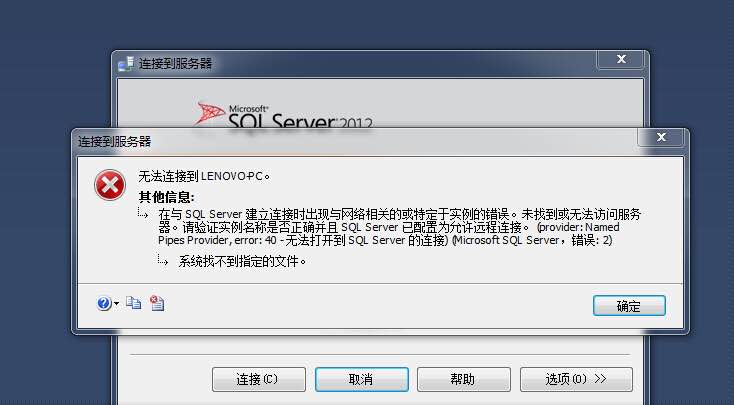
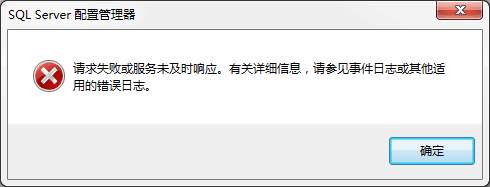
贴下错误日志:2016-07-29 15:03:55.79 Server Microsoft SQL Server 2012 - 11.0.2100.60 (X64) Feb 10 2012 19:39:15 Copyright (c) Microsoft CorporationDeveloper Edition (64-bit) on Windows NT 6.1 <X64> (Build 7601: Service Pack 1)2016-07-29 15:03:55.79 Server (c) Microsoft Corporation.2016-07-29 15:03:55.79 Server All rights reserved.2016-07-29 15:03:55.79 Server Server process ID is 6424.2016-07-29 15:03:55.79 Server System Manufacturer: 'LENOVO', System Model: '20411'.2016-07-29 15:03:55.79 Server Authentication mode is MIXED.2016-07-29 15:03:55.79 Server Logging SQL Server messages in file 'D:\SQL2012\MSSQL11.MSSQLSERVER\MSSQL\Log\ERRORLOG'.2016-07-29 15:03:55.79 Server The service account is 'NT Service\MSSQLSERVER'. This is an informational message; no user action is required.2016-07-29 15:03:55.79 Server Registry startup parameters: -d D:\SQL2012\MSSQL11.MSSQLSERVER\MSSQL\DATA\master.mdf -e D:\SQL2012\MSSQL11.MSSQLSERVER\MSSQL\Log\ERRORLOG -l D:\SQL2012\MSSQL11.MSSQLSERVER\MSSQL\DATA\mastlog.ldf2016-07-29 15:03:55.79 Server Command Line Startup Parameters: -s "MSSQLSERVER"2016-07-29 15:03:55.98 Server SQL Server detected 1 sockets with 2 cores per socket and 4 logical processors per socket, 4 total logical processors; using 4 logical processors based on SQL Server licensing. This is an informational message; no user action is required.2016-07-29 15:03:55.98 Server SQL Server is starting at normal priority base (=7). This is an informational message only. No user action is required.2016-07-29 15:03:55.98 Server Detected 8108 MB of RAM. This is an informational message; no user action is required.2016-07-29 15:03:55.98 Server Using conventional memory in the memory manager.2016-07-29 15:03:56.06 Server This instance of SQL Server last reported using a process ID of 1968 at 2016/7/29 14:29:47 (local) 2016/7/29 6:29:47 (UTC). This is an informational message only; no user action is required.2016-07-29 15:03:56.07 Server Node configuration: node 0: CPU mask: 0x000000000000000f:0 Active CPU mask: 0x000000000000000f:0. This message provides a description of the NUMA configuration for this computer. This is an informational message only. No user action is required.2016-07-29 15:03:56.08 Server Using dynamic lock allocation. Initial allocation of 2500 Lock blocks and 5000 Lock Owner blocks per node. This is an informational message only. No user action is required.2016-07-29 15:03:56.09 Server Software Usage Metrics is disabled.2016-07-29 15:03:56.10 spid5s Starting up database 'master'.2016-07-29 15:03:56.10 spid5s 5 transactions rolled forward in database 'master' (1:0). This is an informational message only. No user action is required.2016-07-29 15:03:56.11 spid5s 0 transactions rolled back in database 'master' (1:0). This is an informational message only. No user action is required.2016-07-29 15:03:56.21 Server CLR version v4.0.30319 loaded.2016-07-29 15:03:56.25 Server Common language runtime (CLR) functionality initialized using CLR version v4.0.30319 from C:\Windows\Microsoft.NET\Framework64\v4.0.30319\.2016-07-29 15:03:56.30 spid5s Resource governor reconfiguration succeeded.2016-07-29 15:03:56.30 spid5s SQL Server Audit is starting the audits. This is an informational message. No user action is required.2016-07-29 15:03:56.30 spid5s SQL Server Audit has started the audits. This is an informational message. No user action is required.2016-07-29 15:03:56.31 spid5s SQL Trace ID 1 was started by login "sa".2016-07-29 15:03:56.31 spid5s Server name is 'LENOVO-PC'. This is an informational message only. No user action is required.2016-07-29 15:03:56.32 spid13s Error: 17190, Severity: 16, State: 1.2016-07-29 15:03:56.32 spid13s Initializing the FallBack certificate failed with error code: 1, state: 20, error number: 0.2016-07-29 15:03:56.32 spid13s Unable to initialize SSL encryption because a valid certificate could not be found, and it is not possible to create a self-signed certificate.2016-07-29 15:03:56.32 spid13s Error: 17182, Severity: 16, State: 1.2016-07-29 15:03:56.32 spid13s TDSSNIClient initialization failed with error 0x80092004, status code 0x80. Reason: Unable to initialize SSL support. Cannot find object or property. 2016-07-29 15:03:56.32 spid13s Error: 17182, Severity: 16, State: 1.2016-07-29 15:03:56.32 spid13s TDSSNIClient initialization failed with error 0x80092004, status code 0x1. Reason: Initialization failed with an infrastructure error. Check for previous errors. Cannot find object or property. 2016-07-29 15:03:56.32 spid13s Error: 17826, Severity: 18, State: 3.2016-07-29 15:03:56.32 spid13s Could not start the network library because of an internal error in the network library. To determine the cause, review the errors immediately preceding this one in the error log.2016-07-29 15:03:56.32 spid13s Error: 17120, Severity: 16, State: 1.2016-07-29 15:03:56.32 spid13s SQL Server could not spawn FRunCommunicationsManager thread. Check the SQL Server error log and the Windows event logs for information about possible related problems.
2016年07月29日 09点07分
3