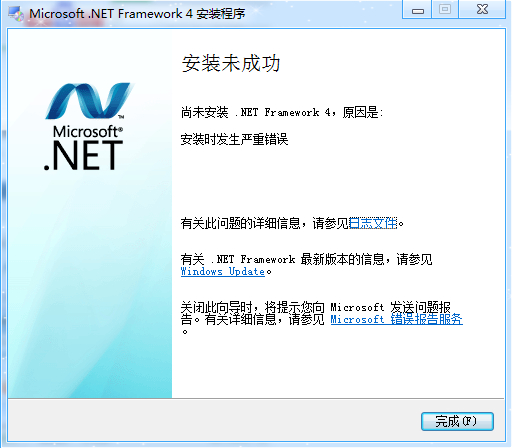
帮帮忙,.NET framework 4.0安装不上怎么回事
net吧
全部回复
仅看楼主
level 1
DLFS 楼主
2016年04月24日 05点04分 1
level 1
DLFS 楼主
OS Version = 6.1.7601, Platform 2, Service Pack 1
OS Description = Windows 7 - x64 Ultimate Edition Service Pack 1
CommandLine = D:\2bd7517f9f1b28a2ccd072c7\\Setup.exe /x86 /x64
Using Simultaneous Download and Install mechanism
Operation: Installing
Package Name = Microsoft .NET Framework 4 Setup
Package Version = 4.0.30319
User Experience Data Collection Policy: Disabled
Number of applicable items: 11
Exe (D:\2bd7517f9f1b28a2ccd072c7\SetupUtility.exe) succeeded.
Exe Log File: dd_SetupUtility.txt
ServiceControl operation succeeded!
Exe (D:\2bd7517f9f1b28a2ccd072c7\Windows6.1-KB958488-v6001-x64.msu) failed with 0x240006 - (null).
Exe (D:\2bd7517f9f1b28a2ccd072c7\SetupUtility.exe) succeeded.
Exe Log File: dd_SetupUtility.txt
MSI (D:\2bd7517f9f1b28a2ccd072c7\netfx_Core_x64.msi) Installation failed. Msi Log: Microsoft .NET Framework 4 Setup_20160424_134440993-MSI_netfx_Core_x64.msi.txt
Final Result: Installation failed with error code: (0x80070643), "安装时发生严重错误 " (Elapsed time: 0 00:00:36).
2016年04月24日 05点04分 2
level 1
http://www.cnblogs.com/coding-hundredOfYears/archive/2012/10/20/2732490.html
安装.NET Framework时出现错误代码0x80070643的可能的解决办法。(参考microsoft官方帮助与支持)
出现这个错误的原因是:如果 MSI 软件更新注册已损坏,或如果计算机中的 .NET 安装已损坏,可能会发生此问题。
方法1:修复 MSI 软件更新注册损坏问题。若要自动修复,可以从http://support.microsoft.com找到相关软件下载,安装即可。但是此方法不适用于win7.
方法2:修复未更新版本的 .NET Framework。
如果您运行的是 Windows Vista 或 Windows 7,请执行以下步骤:
关闭所有应用程序。
单击“开始”,在“搜索”框中键入“卸载”,然后单击“卸载程序”。
双击“Microsoft .NET Framework 4 Client Profile”。
选择“修复 .NET Framework 4 Client Profile 至其原始状态”,然后单击“下一步”。
完成修复后,请单击“完成”。
单击“立即重新启动”以重新启动计算机。
重新启动计算机后,单击“开始”,在“搜索”框中键入“Windows Update”,然后单击“Windows Update”安装最新的 Windows 更新。
如果您运行的是 Windows XP,请执行以下步骤:
关闭所有应用程序。
依次单击“开始”、“控制面板”和“添加或删除程序”。
单击已安装程序列表中的“Microsoft .NET Framework 4 Client Profile”,然后单击“更改/删除”。
选择“修复 .NET Framework 4 Client Profile 至其原始状态”,然后单击“下一步”。
完成修复后,请单击“完成”。
单击“立即重新启动”。
重新启动计算机并登录 Windows 后,单击“开始”,在“搜索”框中键入“Windows Update”,然后单击“Windows Update”。
单击“检查更新”。扫描完成后,单击“安装 Windows 更新”,然后遵循说明执行操作。

2016年04月28日 04点04分 3
1