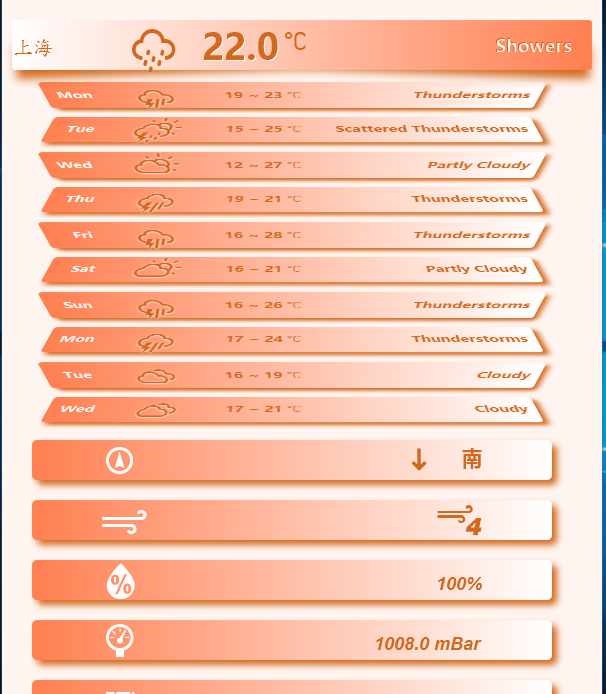
图形界面有时需要“虚”“实”结合,有所突出
javafx吧
全部回复
仅看楼主
level 1
cossin8
楼主
2016年04月16日 02点04分
1
level 4
8871647
有源代码吗
[email protected]
谢谢
2016年04月16日 15点04分
2
level 1
cossin8
楼主
完全可以发给你!
2016年04月17日 01点04分
3
追风520◎
同求源码,
[email protected]
谢谢
2017年12月10日 14点12分
level 8
445786700
楼主也发我一份吧,谢谢
[email protected]
2016年04月23日 19点04分
4
level 1
cossin8
楼主
有时要显示的内容长度超过窗口的长度,如果用滚动窗口太过于俗套,属于swing要做的事,这时,如果把要显示的内容上部折叠起来,下面的部分就可以显示出来了,还是以天气为例,
2016年05月02日 03点05分
5
两片诺氟沙星
没想到jfx能作出这样的效果
2016年11月08日 11点11分
level 1
贴吧用户_0D7JC6A
楼主,求源码
2016年05月18日 01点05分
6
level 1
Midou🙈
求源码,
[email protected]
,谢谢
2016年09月27日 03点09分
7
level 11
♀没用的阿吉♀
这是什么客户端的模块
2016年09月28日 08点09分
8
level 1
cossin8
楼主
很简单,只是用了
javafx.scene.shape.Shape
中的形状加功能union(Shape shape1, Shape shape2),再加上透明功能形成效果
折叠效果是属于伪3D,PerspectiveTransform,比如
2016年09月29日 02点09分
9
level 1
swaredomybest
整个背景怎么整透明的呢
2016年10月01日 13点10分
10
level 1
cossin8
楼主
记住下面三点
public void start(Stage primaryStage) {
primaryStage = new Stage(StageStyle.TRANSPARENT);
........
}
scene背景必须透明
Scene scene = new Scene(root, 300, 250, Color.rgb(255, 0, 0, 0.3));
还有如果用StackPane等用于分布的pane,因为其自身不透明已有白色背景,因此不要用,Group是透明的
2016年10月02日 02点10分
11
level 3
heartNandem
hello,请问一下你们的字体是怎么加粗的?除了自己加载的字体外,好像加粗都没有什么效果啊!
2016年11月02日 01点11分
12
cossin8
系统要有粗体的.ttf, otf文件才出效果。
2016年11月04日 02点11分
level 5
云说淡蓝忧伤
楼主,源代码能给我来一份么?
[email protected]
2016年11月09日 02点11分
13
cossin8
ok
2016年11月10日 01点11分
云说淡蓝忧伤
回复 cossin8 :已经收到,thanks
2016年11月10日 07点11分
level 1
L504919167
跪求源码:
[email protected]
,谢谢楼主~~~
2016年11月30日 04点11分
14
cossin8
注意邮箱
2016年11月30日 05点11分
level 1
情愫💕起🌱床💘
还在吗??谢谢楼主,么么哒
[email protected]
2016年12月08日 11点12分
15
1
2
3
4
尾页











![[真棒]](/static/emoticons/u771fu68d2.png)



![[吐舌]](/static/emoticons/u5410u820c.png)