
level 3
WP242
楼主
在程序代码中使用了panel的move属性,代码如下:
$('#dlg').window('open');
$('#dlg').panel('move',{top:$(document).scrollTop() + ($(window).height()-200) * 0.5});
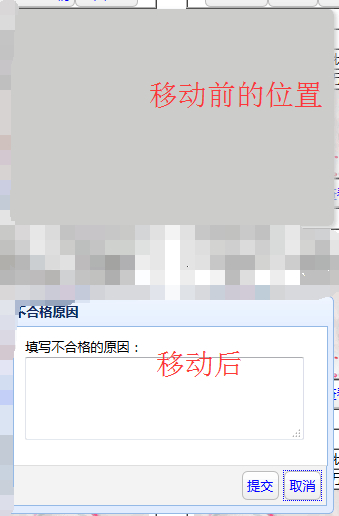
在测试时出现了一个问题:就是打开的窗口能够居中显示(有滚动条也能居中显示),但是在原来的位置上会出现一个跟窗口一样大小的阴影,这是什么情况啊?
窗口代码:
<div id="dlg" class="easyui-dialog" title="不合格原因" style="width:300px;height:200px;padding:10px;left:(screen.width-width) * 0.5;" data-options="closed:true,
buttons: [{
text:'提交',
handler:function(){
alert('提交成功');
$('#dlg').window(close);
}
显示效果如下:
},{
 text:'取消',
handler:function(){
$('#dlg').window(close);
}
}]" >
填写不合格的原因:
<textarea style="height:70px;width:250px;" ></textarea>
</div>
2016年03月10日 02点03分
1
$('#dlg').window('open');
$('#dlg').panel('move',{top:$(document).scrollTop() + ($(window).height()-200) * 0.5});
在测试时出现了一个问题:就是打开的窗口能够居中显示(有滚动条也能居中显示),但是在原来的位置上会出现一个跟窗口一样大小的阴影,这是什么情况啊?
窗口代码:
<div id="dlg" class="easyui-dialog" title="不合格原因" style="width:300px;height:200px;padding:10px;left:(screen.width-width) * 0.5;" data-options="closed:true,
buttons: [{
text:'提交',
handler:function(){
alert('提交成功');
$('#dlg').window(close);
}
显示效果如下:
},{
text:'取消',handler:function(){
$('#dlg').window(close);
}
}]" >
填写不合格的原因:
<textarea style="height:70px;width:250px;" ></textarea>
</div>


![[啊]](/static/emoticons/u554a.png) ?
?