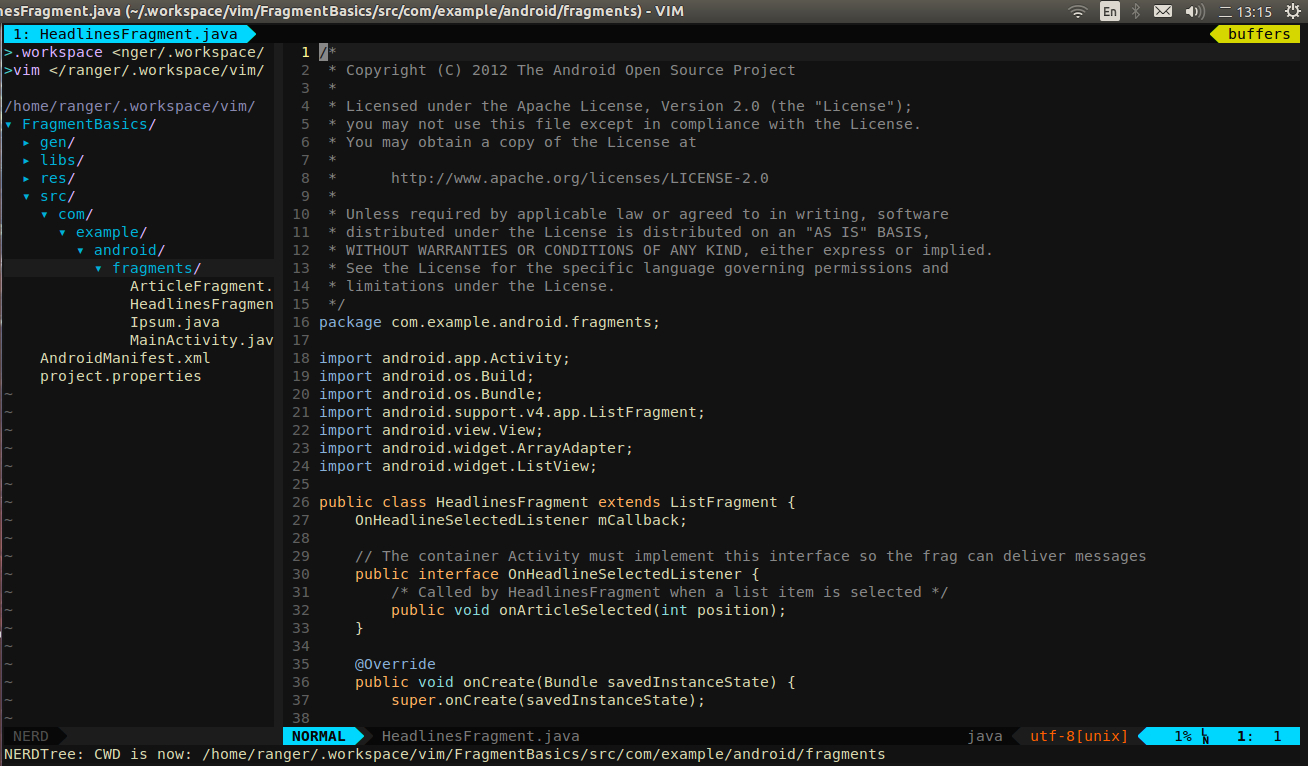
Ubuntu gVim PHP开发平台安装和配置
vim吧
全部回复
仅看楼主
level 11
hejiannn 楼主
gVim安装安装只需一个命令:
sudo apt-get install vim-gtk
下面重点讲插件的安装和配置。
要安装的插件包括:
nerdtree:文件和目录浏览。
ctrlp.vim: 代码和文件模糊查找。
syntastic:支持各种语言的语法检查。
fugitive:git集成。
PIV: PHP集成环境,自动产生PHP文档,Shift+K查看PHP函数文档。
tagbar:函数列表。
ultisnips:提供代码模板功能,但不包含各语言的代码模板。
vim-snippets:提供各种语言的ultisnips的代码模板。
youcompleteme:无处不在的自动补齐
supertab:让ultisnips与youcompleteme协同工作
vim-airline:强大的状态栏。
echofunc:了解函数参数。
vim-twig:Twig模板支持。
vim-css-color:所见及所得的CSS颜色。
vdebug:PHP、Python等可视化调试。
vim-gitgutter:显示文件每一行的修改状态。
通过apt-get安装Ubuntu提供的插件:
Ubuntu已经提供了youcompleteme等插件,可以直接安装:
$ sudo apt-get install vim-youcompleteme
$ vim-addons install youcompleteme
安装matchit插件:
$ vim-addons install matchit
Ubuntu15.04已经提供了fugitive和syntastic等插件,可以直接安装:
$ sudo apt-get install vim-fugitive vim-syntastic vim-ctrlp vim-ultisnips vim-snippets
$ vim-addons install ctrlp
(对于Ubuntu15.04以前的版本,这些插件只能通过Vundle安装)
tagbar要用到ctags,需要先安装:
$ sudo apt-get install exuberant-ctags
其他插件需要通过Vundle安装,先
安装Vundle:
mkdir ~/.vim/bundle
git clone https://github.com/gmarik/Vundle.vim.git ~/.vim/bundle/Vundle.vim
编辑~/.vimrc配置Vundle:
set nocompatible " be iMproved, required
filetype off " required
" set the runtime path to include Vundle and initialize
set rtp+=~/.vim/bundle/Vundle.vim
call vundle#begin()
" alternatively, pass a path where Vundle should install plugins
"call vundle#begin('~/some/path/here')
" let Vundle manage Vundle, required
Plugin 'gmarik/Vundle.vim'
Plugin 'scrooloose/nerdtree'
Plugin 'spf13/PIV' " PHP Integration environment
Plugin 'majutsushi/tagbar'
Plugin 'bling/vim-airline' " Status line
Plugin 'mbbill/echofunc'
Plugin 'evidens/vim-twig'
Plugin 'ap/vim-css-color'
Plugin 'airblade/vim-gitgutter' " Git status for each line
Plugin 'joonty/vdebug' " DBGP debugger
Plugin 'ervandew/supertab'
" All of your Plugins must be added before the following line
call vundle#end() " required
filetype plugin indent on " required
" To ignore plugin indent changes, instead use:
"filetype plugin on
"
" Brief help
" :PluginList - list configured plugins
" :PluginInstall(!) - install (update) plugins
" :PluginSearch(!) foo - search (or refresh cache first) for foo
" :PluginClean(!) - confirm (or auto-approve) removal of unused plugins
"
" see :h vundle for more details or wiki for FAQ
" Put your non-Plugin stuff after this line
如果是Ubuntu 15.04以前的版本,这些插件也需要通过Vundle安装:
Plugin 'scrooloose/syntastic'
Plugin 'tpope/vim-fugitive' " Git wrapper
Plugin 'kien/ctrlp.vim'" Fuzzy file, buffer, mru, tag, etc finder.
Plugin 'sirver/ultisnips'
Plugin 'honza/vim-snippets'" Snippets for snipmate
然后重新启动gVim并运行:
:PluginInstall
完成插件的最后安装
2015年03月09日 15点03分 1
level 11
hejiannn 楼主

插件的配置:
编辑~/.vimrc在里面添加插件的配置:
" NERDTree
map <C-n> :NERDTreeToggle<CR>
" Tagbar
nmap <F8> :TagbarToggle<CR>
" AirLine
set laststatus=2
" make YCM compatible with UltiSnips (using supertab)
let g:ycm_key_list_select_completion = ['<C-n>', '<Down>']
let g:ycm_key_list_previous_completion = ['<C-p>', '<Up>']
let g:SuperTabDefaultCompletionType = '<C-n>'
" better key bindings for UltiSnipsExpandTrigger
let g:UltiSnipsExpandTrigger = "<tab>"
let g:UltiSnipsJumpForwardTrigger = "<tab>"
let g:UltiSnipsJumpBackwardTrigger = "<s-tab>"
2015年03月09日 15点03分 2
这个除了Ubuntu外,可以安装到Mac os上么?
2015年04月16日 19点04分
是直接在.virmc文件后添加就可以了吗
2015年06月05日 14点06分
level 11
hejiannn 楼主
这是我的完整的~/.vimrc文件:
set nocompatible " be iMproved, required
filetype off " required
" set the runtime path to include Vundle and initialize
set rtp+=~/.vim/bundle/Vundle.vim
call vundle#begin()
" alternatively, pass a path where Vundle should install plugins
"call vundle#begin('~/some/path/here')
" let Vundle manage Vundle, required
Plugin 'gmarik/Vundle.vim'
Plugin 'scrooloose/nerdtree'
Plugin 'spf13/PIV' " PHP Integration environment
Plugin 'majutsushi/tagbar'
Plugin 'bling/vim-airline' " Status line
Plugin 'mbbill/echofunc'
Plugin 'evidens/vim-twig'
Plugin 'ap/vim-css-color'
Plugin 'airblade/vim-gitgutter' " Git status for each line
Plugin 'joonty/vdebug' " DBGP debugger
Plugin 'ervandew/supertab'
" All of your Plugins must be added before the following line
call vundle#end() " required
filetype plugin indent on " required
" To ignore plugin indent changes, instead use:
"filetype plugin on
"
" Brief help
" :PluginList - list configured plugins
" :PluginInstall(!) - install (update) plugins
" :PluginSearch(!) foo - search (or refresh cache first) for foo
" :PluginClean(!) - confirm (or auto-approve) removal of unused plugins
"
" see :h vundle for more details or wiki for FAQ
" Put your non-Plugin stuff after this line
if has("gui_gtk2")
set guifont=DejaVu\ Sans\ Mono\ 12
end
set expandtab
set tabstop=2
set shiftwidth=2
set autoindent
set smartindent
if has("autocmd")
" Drupal *.module and *.install files.
augroup module
autocmd BufRead,BufNewFile *.module set filetype=php
autocmd BufRead,BufNewFile *.install set filetype=php
autocmd BufRead,BufNewFile *.test set filetype=php
autocmd BufRead,BufNewFile *.inc set filetype=php
autocmd BufRead,BufNewFile *.profile set filetype=php
autocmd BufRead,BufNewFile *.view set filetype=php
autocmd BufRead,BufNewFile *.theme set filetype=php
augroup END
endif
syntax on
autocmd FileType php set omnifunc=phpcomplete#CompletePHP
let php_parent_error_close = 1
let php_parent_error_open = 1
let php_folding = 1
set number
set hlsearch
filetype indent on
set fileencodings=ucs-bom,utf-8,gbk,default,latin1
set encoding=utf-8
" NERDTree
map <C-n> :NERDTreeToggle<CR>
" Tagbar
nmap <F8> :TagbarToggle<CR>
" AirLine
set laststatus=2
" make YCM compatible with UltiSnips (using supertab)
let g:ycm_key_list_select_completion = ['<C-n>', '<Down>']
let g:ycm_key_list_previous_completion = ['<C-p>', '<Up>']
let g:SuperTabDefaultCompletionType = '<C-n>'
" better key bindings for UltiSnipsExpandTrigger
let g:UltiSnipsExpandTrigger = "<tab>"
let g:UltiSnipsJumpForwardTrigger = "<tab>"
let g:UltiSnipsJumpBackwardTrigger = "<s-tab>"
colorscheme desert
2015年03月09日 15点03分 3
注意: vim-gitgutter可能导致gVim菜单无效,如果用gVim的就不要装gitgutter了。。。
2015年03月18日 06点03分
level 6
没换powerline字体补丁啊?
2015年03月09日 16点03分 4
怎么换?教教我。
2015年03月09日 16点03分
@hejiannn 手机上不好回答,明天答复你,我是xterm终端打开的vim,安装powline字体(复制字体到/usr/share/fonts/下,然后终端执行几个命令安装字体和刷新字体缓存)后,在/etc/X11/app-defaults/XTerm-color这个文件加入DejaVu Sans Mono for Powerline
2015年03月09日 16点03分
@hejiannn 具体细节这里讲不明白,明天截图给你看。
2015年03月09日 16点03分
回复
���Ի��ǵĴ���
:哦,我对xterm没需求。
2015年03月10日 01点03分
level 6
jellybeans更好看。
2015年03月09日 16点03分 5
level 6
另外问一句,我是下载vim压缩包编译安装的,指定安装换目录是/opt下,这种情况下如何安装插件管理vundle之类的插件?
2015年03月09日 16点03分 6
这个我不懂啊,没编译过vim。。。
2015年03月09日 16点03分
@hejiannn 好吧,算我另类,费了好大心思才解决xterm终端下vim的配色问题,不过只能正确显示少数几个配色,如jellybeans,solarized等。
2015年03月09日 16点03分
level 1
收藏了
2015年03月09日 18点03分 7
level 6
1.先给系统安装powline字体;
先从这个git
上下载powline补丁文件fonts.zip:
压缩档管理软件解压补丁文件;
里面有个install.sh文件, 给这个文件添加可执行权限: sudo chmod +x ~/fonts/install.sh ;
然后执行它: ./install.sh ,就会看到家目录下有.fonts文件夹, 默认是隐藏的;
把这个文件夹改名, .font 去掉 . 改成 powline ;
然后把这个文件复制到 /usr/share/fonts 下, sudo cp -r powline /usr/share/fonts ;
再终端逐个执行命令:
mkfontscale
mkfontdir
fc-cache -vf
然后就可以在libreoffice writer 裏面看到;
然后我在 /etc/X11/app-defaults/ 下的这个文件 XTerm-color 裏添加这个字体就可以在vim裏看到airline的效果了;
不过我不知道gvim如何指定字体, 你找找看如何设置gvim的字体.
2015年03月10日 05点03分 8
哦, 有个地方错了, 是改成powerline, 而不是powline.
2015年03月10日 05点03分
level 6
如果在 .vimrc 裏面 设置下面这两项 :
let g:airline
#extensions#
tabline#left_sep=' '
let g:airline
#extensions#
tabline#left_alt_sep='|'
buffer和tab的标签标题就会变成这样, 没有向右尖头的:
我的.vimrc 裏 airline 设置 :
let g:airline_powerline_fonts=1
let g:airline
#extensions#
tabline#enabled=1
"let g:airline
#extensions#
tabline#left_sep=' '
"let g:airline
#extensions#
tabline#left_alt_sep='|'
let g:airline
#extensions#
tabline#buffer_nr_show=1
let g:airline_theme='simple'
2015年03月10日 05点03分 9
powerline字体确实漂亮。
2015年03月11日 02点03分
level 1
为啥不用eclipse
2015年03月10日 22点03分 10
eclipse功能太弱,例如不显示文件和每行代码的修改状态,特别是缺乏PHP/HTML代码补齐功能。
2015年03月11日 02点03分
@hejiannn 哦,这样啊!应该在那上边也有插件吧
2015年03月11日 05点03分
@orange77762 没有
2015年03月11日 05点03分
@hejiannn 哦,谢谢你啊,想问下你的gvim截图后面是啥播放器啊!
2015年03月11日 10点03分
level 1
楼主 ,php 按照你的方式安了插件,PHP 不自动补全。但会高亮
2015年03月21日 07点03分 11
youcompleteme插件安装好了的么?
2015年03月21日 08点03分
@hejiannn 安好了的
2015年03月21日 08点03分
level 1
2015年03月21日 08点03分 12
level 1
要提示 但是连 require 这种都没有 应该没有提示PHP 吧
2015年03月21日 08点03分 13
PHP函数补齐用<C-x><C-o> 例如敲入mysql_然后敲Ctrl+x和Ctrl+x就能补齐了。。。
2015年03月21日 09点03分
@hejiannn 哦,谢谢,回去试试
2015年03月21日 10点03分
level 11
话说为啥我gvim也是用desert的配色方案,但是显示的完全不一样呢。
2015年03月30日 01点03分 14
你的是怎样显示的? :colorscheme结果是啥?
2015年03月30日 13点03分
@hejiannn desert的配色方案,但是输入内容就会间隔很大,不知道是神马情况。
2015年03月30日 14点03分
@1311933064 输入内容间隔很大是字体问题把。在~/.vimrc里添加: set guifont=Ubuntu\ Mono\ 13
2015年03月30日 15点03分
@hejiannn 好吧,真是字体设置的问题。感谢大神。
2015年03月30日 15点03分
level 11
我还想问下,楼主的gvim如何做到的背景透明。
2015年03月31日 09点03分 15
2015年03月31日 13点03分
@hejiannn 可是我设置之后还是木有透明?难道还要设置别的?
2015年04月01日 01点04分
@hejiannn 我注销一下就好了.
2015年04月01日 01点04分
level 6
楼主这些插件都有文档吗?还有,用了自动补全之后会出现一个临时窗口
2015年05月29日 02点05分 16
哈哈,关于临时窗口发完我就后悔了,,,仔细一想,是函数原型,,强大[真棒]
2015年05月29日 02点05分
level 12
好顶赞[太开心]
2015年06月03日 06点06分 17
level 10
楼主怎么配置vunble啊
2015年06月05日 00点06分 18
level 1
跪求楼主打包下载[泪]
2015年07月01日 15点07分 19
level 1
你的YCM这样配置不行啊,只能补全本地数据的, 是不是还需要.ycm_global_ycm_extra_conf.py
2015年10月09日 02点10分 20
1 2 3 尾页