
level 6
月亮上的石头
楼主
经过我的寻觅,在美国官网上找到了教程示意图。引用如下,给大家参考。
Removal steps of the back cover assembly. Release the hooks around the dock connector gently using your fingers.
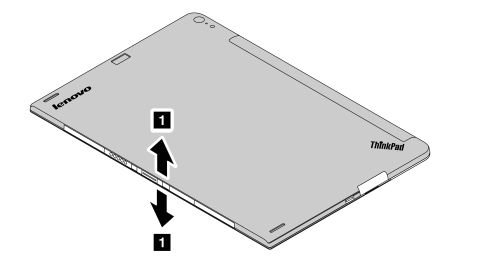 Release other hooks in numerical order as shown by using the hook-releasing tool.
 Note: Do not insert the hook-releasing tool into the hook hole area of the USB door as shown. Otherwise, the hook will be deformed.
 Release the right-bottom side of the back cover assembly first, and then release the left-bottom side.
 Lift up the upper-right corner of the back cover assembly, and then slide the back cover assembly to the left-upper corner to release the back cover assembly.

2014年12月18日 01点12分
1
Removal steps of the back cover assembly. Release the hooks around the dock connector gently using your fingers.
Release other hooks in numerical order as shown by using the hook-releasing tool.Note: Do not insert the hook-releasing tool into the hook hole area of the USB door as shown. Otherwise, the hook will be deformed.Release the right-bottom side of the back cover assembly first, and then release the left-bottom side.Lift up the upper-right corner of the back cover assembly, and then slide the back cover assembly to the left-upper corner to release the back cover assembly.








![[吐]](/static/emoticons/u5410.png)