level 7
liekong
楼主
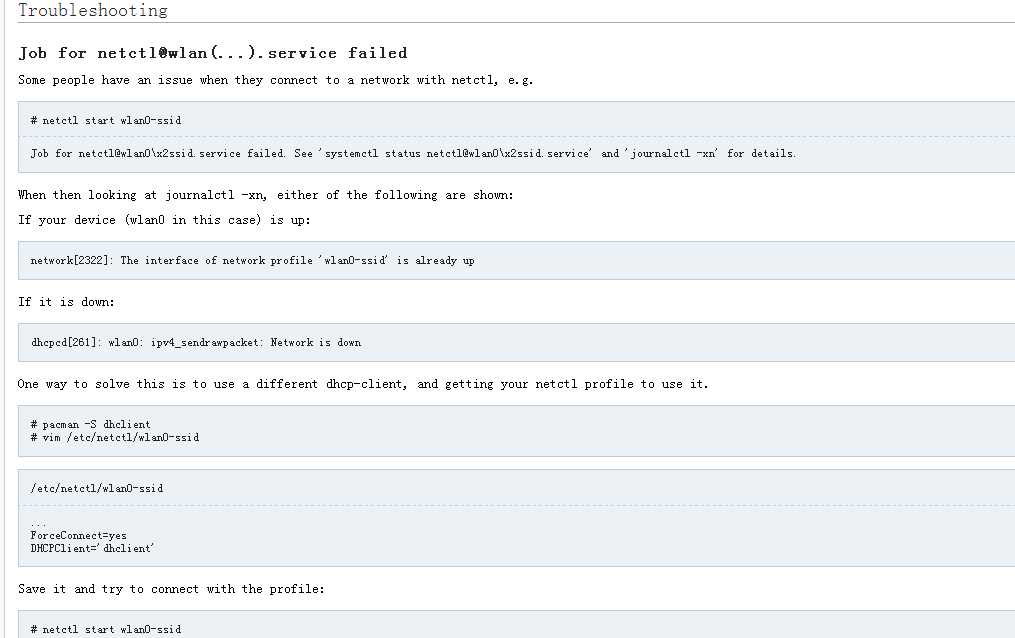
使用wifi-menu连接wifi报错:
Job for netctl@wlp3s0\x2dTP\x2dLINK_PocketAP_A34BA4.service failed. See 'systemctl status netctl@wlp3s0\x2dTP\x2dLINK_PocketAP_A34BA4.service' and 'journalctl -xn' for details.
然后根据提示查看错误信息,执行systemctl status netctl@wlp3s0\x2dTP\x2dLINK_PocketAP_A34BA4.service显示:
netctl@wlp3s0x2dTPx2dLINK_PocketAP_A34BA4.service - Networking for netctl profile wlp3s0x2dTPx2dLINK_PocketAP_A34BA4
Loaded: loaded (/usr/lib/systemd/system/[email protected]; static)
Active: inactive (dead)
Docs: man:netctl.profile(5)
执行journalctl -xn显示:
-- Logs begin at Mon 2014-01-20 23:35:46 CST, end at Thu 2014-03-27 22:45:12 CST. --
Mar 27 22:45:03 WWL-NOTE sudo[1381]: pam_unix(sudo:session): session opened for user root by wwl(uid=0)
Mar 27 22:45:12 WWL-NOTE systemd[1]: Stopped Networking for netctl profile wlp3s0-snewfly.
-- Subject: Unit netctl@wlp3s0\x2dsnewfly.service has finished shutting down
-- Defined-By: systemd
-- Support: http://lists.freedesktop.org/mailman/listinfo/systemd-devel
--
-- Unit netctl@wlp3s0\x2dsnewfly.service has finished shutting down.
Mar 27 22:45:12 WWL-NOTE systemd[1]: Stopped Networking for netctl profile wlp3s0-TP-LINK_PocketAP_A34BA4.
-- Subject: Unit netctl@wlp3s0\x2dTP\x2dLINK_PocketAP_A34BA4.service has finished shutting down
-- Defined-By: systemd
-- Support: http://lists.freedesktop.org/mailman/listinfo/systemd-devel
--
-- Unit netctl@wlp3s0\x2dTP\x2dLINK_PocketAP_A34BA4.service has finished shutting down.
Mar 27 22:45:12 WWL-NOTE systemd[1]: Starting Networking for netctl profile wlp3s0-TP-LINK_PocketAP_A34BA4...
-- Subject: Unit netctl@wlp3s0\x2dTP\x2dLINK_PocketAP_A34BA4.service has begun with start-up
-- Defined-By: systemd
-- Support: http://lists.freedesktop.org/mailman/listinfo/systemd-devel
--
-- Unit netctl@wlp3s0\x2dTP\x2dLINK_PocketAP_A34BA4.service has begun starting up.
Mar 27 22:45:12 WWL-NOTE network[1450]: Starting network profile 'wlp3s0-TP-LINK_PocketAP_A34BA4'...
Mar 27 22:45:12 WWL-NOTE network[1450]: The interface of network profile 'wlp3s0-TP-LINK_PocketAP_A34BA4' is already up
Mar 27 22:45:12 WWL-NOTE systemd[1]: netctl@wlp3s0\x2dTP\x2dLINK_PocketAP_A34BA4.service: main process exited, code=exited, status=1/FAILURE
Mar 27 22:45:12 WWL-NOTE systemd[1]: Failed to start Networking for netctl profile wlp3s0-TP-LINK_PocketAP_A34BA4.
-- Subject: Unit netctl@wlp3s0\x2dTP\x2dLINK_PocketAP_A34BA4.service has failed
-- Defined-By: systemd-- Support: http://lists.freedesktop.org/mailman/listinfo/systemd-devel
--
-- Unit netctl@wlp3s0\x2dTP\x2dLINK_PocketAP_A34BA4.service has failed.
--
-- The result is failed.
Mar 27 22:45:12 WWL-NOTE systemd[1]: Unit netctl@wlp3s0\x2dTP\x2dLINK_PocketAP_A34BA4.service entered failed state.
Mar 27 22:45:12 WWL-NOTE sudo[1381]: pam_unix(sudo:session): session closed for user root
求救......
2014年03月27日 06点03分
1
Job for netctl@wlp3s0\x2dTP\x2dLINK_PocketAP_A34BA4.service failed. See 'systemctl status netctl@wlp3s0\x2dTP\x2dLINK_PocketAP_A34BA4.service' and 'journalctl -xn' for details.
然后根据提示查看错误信息,执行systemctl status netctl@wlp3s0\x2dTP\x2dLINK_PocketAP_A34BA4.service显示:
netctl@wlp3s0x2dTPx2dLINK_PocketAP_A34BA4.service - Networking for netctl profile wlp3s0x2dTPx2dLINK_PocketAP_A34BA4
Loaded: loaded (/usr/lib/systemd/system/[email protected]; static)
Active: inactive (dead)
Docs: man:netctl.profile(5)
执行journalctl -xn显示:
-- Logs begin at Mon 2014-01-20 23:35:46 CST, end at Thu 2014-03-27 22:45:12 CST. --
Mar 27 22:45:03 WWL-NOTE sudo[1381]: pam_unix(sudo:session): session opened for user root by wwl(uid=0)
Mar 27 22:45:12 WWL-NOTE systemd[1]: Stopped Networking for netctl profile wlp3s0-snewfly.
-- Subject: Unit netctl@wlp3s0\x2dsnewfly.service has finished shutting down
-- Defined-By: systemd
-- Support: http://lists.freedesktop.org/mailman/listinfo/systemd-devel
--
-- Unit netctl@wlp3s0\x2dsnewfly.service has finished shutting down.
Mar 27 22:45:12 WWL-NOTE systemd[1]: Stopped Networking for netctl profile wlp3s0-TP-LINK_PocketAP_A34BA4.
-- Subject: Unit netctl@wlp3s0\x2dTP\x2dLINK_PocketAP_A34BA4.service has finished shutting down
-- Defined-By: systemd
-- Support: http://lists.freedesktop.org/mailman/listinfo/systemd-devel
--
-- Unit netctl@wlp3s0\x2dTP\x2dLINK_PocketAP_A34BA4.service has finished shutting down.
Mar 27 22:45:12 WWL-NOTE systemd[1]: Starting Networking for netctl profile wlp3s0-TP-LINK_PocketAP_A34BA4...
-- Subject: Unit netctl@wlp3s0\x2dTP\x2dLINK_PocketAP_A34BA4.service has begun with start-up
-- Defined-By: systemd
-- Support: http://lists.freedesktop.org/mailman/listinfo/systemd-devel
--
-- Unit netctl@wlp3s0\x2dTP\x2dLINK_PocketAP_A34BA4.service has begun starting up.
Mar 27 22:45:12 WWL-NOTE network[1450]: Starting network profile 'wlp3s0-TP-LINK_PocketAP_A34BA4'...
Mar 27 22:45:12 WWL-NOTE network[1450]: The interface of network profile 'wlp3s0-TP-LINK_PocketAP_A34BA4' is already up
Mar 27 22:45:12 WWL-NOTE systemd[1]: netctl@wlp3s0\x2dTP\x2dLINK_PocketAP_A34BA4.service: main process exited, code=exited, status=1/FAILURE
Mar 27 22:45:12 WWL-NOTE systemd[1]: Failed to start Networking for netctl profile wlp3s0-TP-LINK_PocketAP_A34BA4.
-- Subject: Unit netctl@wlp3s0\x2dTP\x2dLINK_PocketAP_A34BA4.service has failed
-- Defined-By: systemd-- Support: http://lists.freedesktop.org/mailman/listinfo/systemd-devel
--
-- Unit netctl@wlp3s0\x2dTP\x2dLINK_PocketAP_A34BA4.service has failed.
--
-- The result is failed.
Mar 27 22:45:12 WWL-NOTE systemd[1]: Unit netctl@wlp3s0\x2dTP\x2dLINK_PocketAP_A34BA4.service entered failed state.
Mar 27 22:45:12 WWL-NOTE sudo[1381]: pam_unix(sudo:session): session closed for user root
求救......











![[不高兴]](/static/emoticons/u4e0du9ad8u5174.png)