安装debian7后fcitx输入法不能启动
debian吧
全部回复
仅看楼主
level 1
风狂王
楼主
RT,求大神指教!
2013年05月11日 10点05分
1
level 6
921025789
同求,我也是输入法没法子启动
2013年05月11日 10点05分
2
level 1
风狂王
楼主
召唤吧主
@歌舒天晓
2013年05月11日 10点05分
3
level 7
tang88seng
先 dpkg-reconfigure fcitx
2013年05月11日 11点05分
4
风狂王
没什么用
2013年05月16日 12点05分
level 2
贺赖只海
装个IBUS算了,我装了 FCITX也启动不了,立马换了IBUS,能打汉字就行了
2013年05月11日 11点05分
5
level 13
歌舒天晓
在终端输入fcitx,启动看看返回什么。
2013年05月11日 14点05分
6
level 3
tom0018
新力德搜索fcitx,把除了码表的都安上
2013年05月12日 19点05分
7
level 6
cqlym203
我的fcitx,ibus都出问题了,哎
——来自 诺基亚 Lumia 720
2013年05月13日 03点05分
8
level 2
小下白读文库
我的也不能启动,可郁闷了
2013年05月13日 07点05分
9
level 5
NatMorphling
从终端能启动吗
2013年05月13日 08点05分
10
level 1
风狂王
楼主
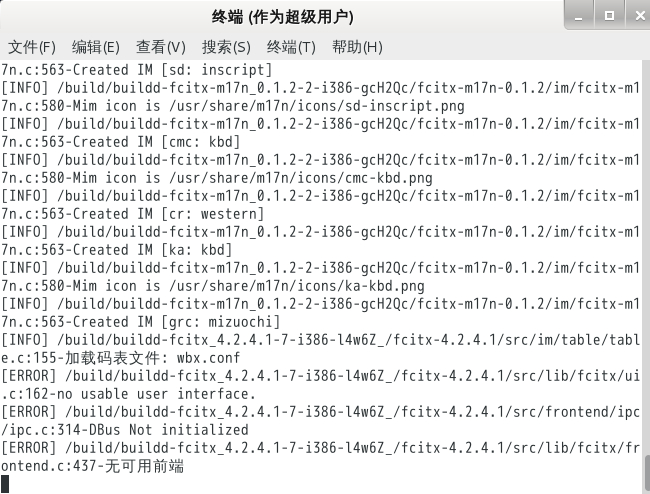
终端输入fcitx,回车之后显示了几十行信息,最后是这个
@歌舒天晓
2013年05月16日 12点05分
11
歌舒天晓
它不是说无可用前端么?你安装了么?另外这是编译的么? 我也不大懂,
2013年05月16日 15点05分
智能终端
你少装了一个ui-class
2014年07月21日 18点07分
level 1
旗木当家的
我跟楼主的问题一样啊!在终端启动fcitx后,提示no usable user interface,现在可以输中文,就是没有选择框
2013年05月16日 13点05分
12
level 5
不懈又刚强丶繁花03
第一次发链接,感觉好失败的说
2013年05月16日 15点05分
14
不懈又刚强丶繁花03
妹的,真吞了。。。http额://额
www.mintos.
额org/system/quantal-fcitx.html
2013年05月16日 15点05分
WoodRadio
安装 fcitx-frontend-qt4和fcitx-frontend-gtk2,然后重启就可以了
2013年10月15日 09点10分
level 1
WoodRadio
安装 fcitx-frontend-qt4和fcitx-frontend-gtk2,然后重启就可以了
2013年10月15日 09点10分
15
IronWard
谢谢你了
2013年10月15日 17点10分
level 6
asd2003asd1234
我的fcitx只能在浏览器里输汉字。
2013年10月16日 04点10分
16
level 9
CHCY_parkchen
一直ibus-wubi,从来没出现过任何问题!
2013年10月16日 04点10分
17
level 6
后知后觉后觉醒
我的是装了个fcitx-pinyin就能用了
2013年10月19日 05点10分
18
Byakuya_Hack
因为他没有装fcitx-pinyin,只是直接装了fcitx. 还要输入im-config,手工选择输入法
2013年10月21日 18点10分
level 10
心海千帆
sudo apt-get install fcitx fcitx-frontend-all fcitx-ui-light fcitx-ui-classic fcitx-sunpinyin
2014年07月23日 04点07分
19
1





![[囧]](/static/emoticons/u56e7.png) 第一次发链接,感觉好失败的说
第一次发链接,感觉好失败的说










![[揉脸]](/static/emoticons/u63c9u8138.png)