level 11
記憶灬斑駁
楼主
仅供
娱乐 依据
本吧要求
请不要
到他人帖子里
乱水
,
影响他人交流!
!强烈
鄙视放低质量图片
!
第一步:先复制下端代码
javascript:var%20c=rich_postor._getData();c.content='</span><img%20unselectable="on"%20pic_type=""%20%20%20class="BDE_Smiley"src="https://imgsa.baidu.com/album/s=1100;q=90/sign=b6916c173812b31bc36cc928b6280d0b/e4dde71190ef76c662f30b7b9c16fdfaaf5167
b 9.jpg"height="600"%20%20%20width="1300">';PostHandler.post(rich_postor._option.url,c,function(I){rich_postor.showAddResult%20%20(I)},function(I){});void%200
(加红部分的空格需删掉)
第二部:新建书签
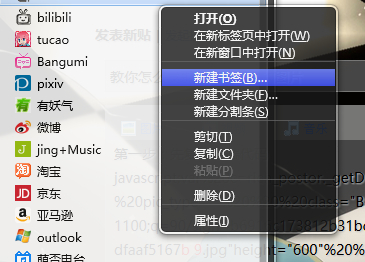 将代码粘贴至地址,名称随意。然后点添加
 第三部:在帖子内点击该书签
使劲玩吧。赶紧把这个BUG玩死吧
 图片来自: 丨花名未知丶的百度相册
————给你甜头的人通常别有目的、、、
————此信息由火狐浏览器回复、我拒绝被浏览器奴役、我为自己代言、、、

![[哈哈]](/static/emoticons/u54c8u54c8.png)






![[汗]](/static/emoticons/u6c57.png)


![[啊!]](/static/emoticons/u554auff01.png)



![[真棒]](/static/emoticons/u771fu68d2.png)