教大家怎么自己做锁屏图片(申精)
htc8s吧
全部回复
仅看楼主
level 12
皮只羊皮的豺狼
楼主
——来自 爱贴吧 Windows Phone 客户端
2013年04月09日 12点04分
1
level 12
皮只羊皮的豺狼
楼主
首先下载这个软件
——来自 爱贴吧 Windows Phone 客户端
2013年04月09日 12点04分
2
level 12
皮只羊皮的豺狼
楼主
之后打开
——来自 爱贴吧 Windows Phone 客户端
2013年04月09日 12点04分
3
level 12
皮只羊皮的豺狼
楼主
选择一个自己喜欢的模板,并且点击
——来自 爱贴吧 Windows Phone 客户端
2013年04月09日 12点04分
4
level 12
皮只羊皮的豺狼
楼主
出现后,点击模板碎片中的其中一个
——来自 爱贴吧 Windows Phone 客户端
2013年04月09日 12点04分
5
level 12
皮只羊皮的豺狼
楼主
点击下方的插图按钮
——来自 爱贴吧 Windows Phone 客户端
2013年04月09日 12点04分
6
level 12
皮只羊皮的豺狼
楼主
选择自己喜欢的图案,并调整好大小个方向
——来自 爱贴吧 Windows Phone 客户端
2013年04月09日 12点04分
7
level 12
皮只羊皮的豺狼
楼主
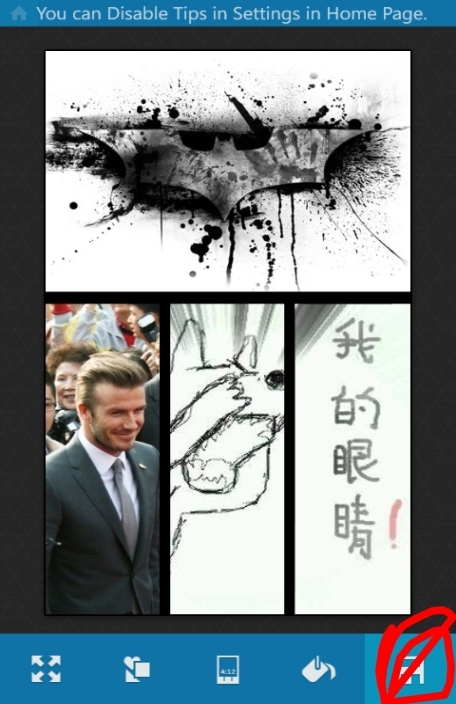
之后点击保存按钮
这时回到自己的像册,进入“保存的图片”就能找到自己制作的屏保
——来自 爱贴吧 Windows Phone 客户端
2013年04月09日 12点04分
8
level 12
皮只羊皮的豺狼
楼主
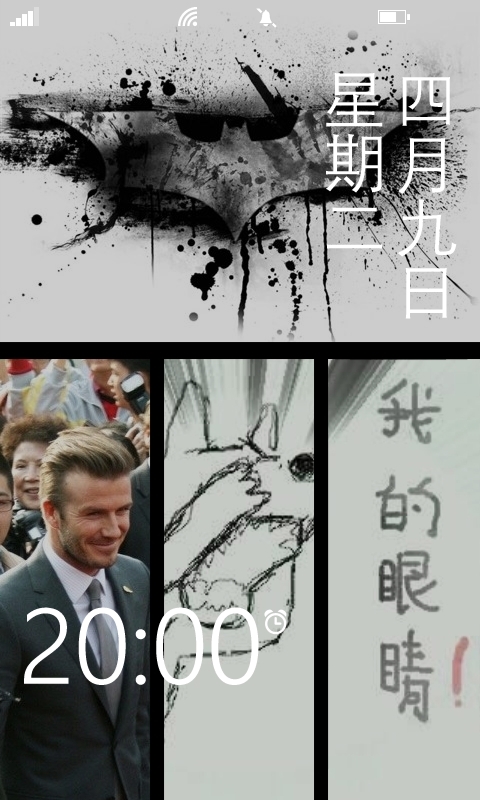
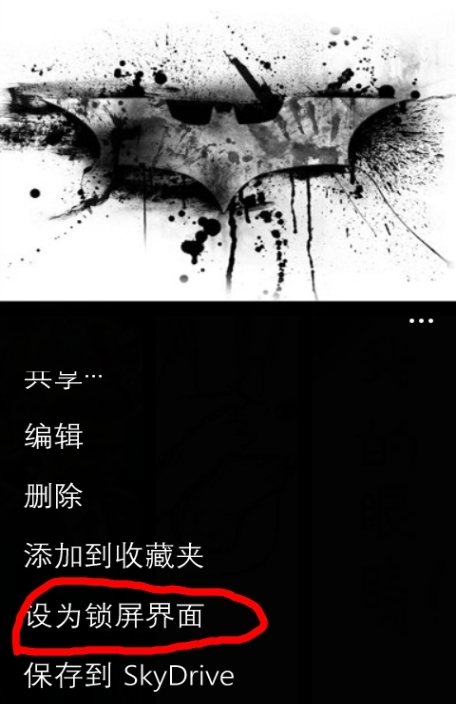
最后,打开图片,按“设为锁屏”按钮
——来自 爱贴吧 Windows Phone 客户端
2013年04月09日 12点04分
9
level 12
皮只羊皮的豺狼
楼主
如果想要换图片风格的话也可以
——来自 爱贴吧 Windows Phone 客户端
2013年04月09日 12点04分
10
level 12
嗯哼cw
收了,赞一个,技术贴
2013年04月09日 13点04分
11
皮只羊皮的豺狼
嗯嗯 ——来自 爱贴吧 Windows Phone 客户端
2013年04月10日 11点04分
level 9
七一一◎
收了
---十五字十五字来自我亲爱的柔弱的娇小的小8。
2013年04月10日 03点04分
12
level 8
纽约市消防局
笑而不语
2013年04月10日 11点04分
13
皮只羊皮的豺狼
——来自 爱贴吧 Windows Phone 客户端
2013年04月10日 12点04分
level 6
794410526
回一个,
——来自 爱贴吧 Windows Phone 客户端
2013年04月10日 13点04分
14
皮只羊皮的豺狼
谢谢 ——来自 爱贴吧 Windows Phone 客户端
2013年04月14日 08点04分
level 1
贴吧用户_0QStGJU
不知道什么软件名字
2013年10月23日 16点10分
15
level 1
醉心花泪
是什么软件啊
2015年08月22日 15点08分
16
level 1
醉心花泪
名字
2015年08月22日 15点08分
17
1






![[吐舌]](/static/emoticons/u5410u820c.png)
![[老大]](/static/emoticons/u8001u5927.png) ——来自 爱贴吧 Windows Phone 客户端
——来自 爱贴吧 Windows Phone 客户端